When you build the pivot table in the Excel interface, you should take care in the Layout dialog box to notice that the field reads Count of Revenue instead of Sum of Revenue. At that point, the right thing is to go back and fix the data, but what people usually do is double-click the Count of Revenue button and change it to Sum of Revenue.
In VBA, you should always explicitly define that you are creating a sum of revenue by explicitly setting the Function property to xlSum:
' Set up the data fields
With PT.PivotFields("Revenue")
    .Orientation = xlDataField
    .Function = xlSum
    .Position = 1
End With
At this point, you've given VBA all the settings required to correctly generate the pivot table. If you set ManualUpdate to False, Excel calculates and draws the pivot table. You can immediately thereafter set this back to TRue:
' Calc the pivot table
PT.ManualUpdate = False
PT.ManualUpdate = True
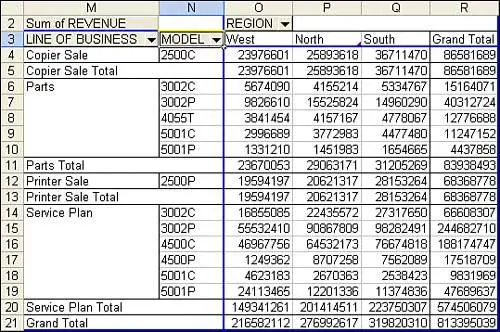
At this point, you will have a complete pivot table like the one shown in Figure 3.
3. Less than 50 lines of code create this pivot table in under a second.
Here is the complete code used to generate the pivot table:
Sub CreatePivot()
    Dim WSD As Worksheet
    Dim PTCache As PivotCache
    Dim PT As PivotTable
    Dim PRange As Range
    Dim FinalRow As Long
    Dim FinalCol As Long
    Set WSD = Worksheets("PivotTable")

    ' Delete any prior pivot tables
    For Each PT In WSD.PivotTables
        PT.TableRange2.Clear
    Next PT

    ' Define input area and set up a Pivot Cache
    FinalRow = WSD.Cells(Application.Rows.Count, 1).End(xlUp).Row
    FinalCol = WSD.Cells(1, Application.Columns.Count). _
        End(xlToLeft).Column
    Set PRange = WSD.Cells(1, 1).Resize(FinalRow, FinalCol)
    Set PTCache = ActiveWorkbook.PivotCaches.Add(SourceType:= _
        xlDatabase, SourceData:=PRange)

    ' Create the Pivot Table from the Pivot Cache
    Set PT = PTCache.CreatePivotTable(TableDestination:=WSD. _
        Cells(2, FinalCol + 2), TableName:="PivotTable1")

    ' Turn off updating while building the table
    PT.ManualUpdate = True

    ' Set up the row & column fields
    PT.AddFields RowFields:=Array("Line of Business", "Model"), _
        ColumnFields:="Region"

    ' Set up the data fields
    With PT.PivotFields("Revenue")
        .Orientation = xlDataField
        .Function = xlSum
        .Position = 1
    End With

    ' Calc the pivot table
    PT.ManualUpdate = False
    PT.ManualUpdate = True

End Sub
Cannot Move or Change Part of a Pivot Report
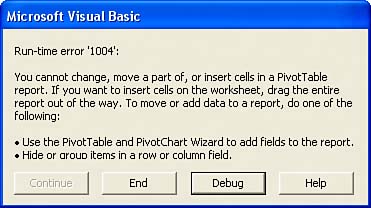
Although pivot tables are incredible, they have annoying limitations. You cannot move or change just a part of a pivot table. For example, try to run a macro that would delete column R, which contains the Grand Total column of the pivot table. The macro comes to a screeching halt with an error 1004, as shown in Figure 4.
4. You cannot delete just a part of a pivot table. To get around this limitation, you can change the summary from a pivot table to just values.