On the Stage, select the instance of Button 1.
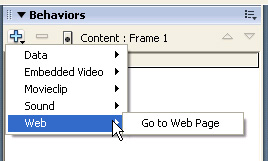
In the Behaviors panel (Window > Behaviors), click Add Behavior and select Web > Go to Web Page.
In the Go to URL dialog box, select _blank in the Open In pop-up menu to open the URL in a new browser window. In the URL text box, either accept the default setting of
http://www.macromedia.comor enter a different URL. Click OK.If desired, repeat the previous steps, selecting Button 2 and then Button 3, to add navigation to those buttons as well.
Click the pop-up menu control in the upper-right side of the Behavior panel, and select Close Panel.
Test the SWF file
You'll test your document to view the button animation and see if the navigation works as expected.
Save your document and select Control > Test Movie.
Move the mouse pointer over the instance of Button 1 to view the color animation that you created.
Click the button to see if your web browser opens to the URL that you specified.
If you added navigation to the other two buttons, test those buttons as well.
When you finish viewing the SWF file, close the SWF file and web browser windows.
Summary
Congratulations on learning about buttons. In a few minutes, you were able to accomplish the following tasks:
Create a button from grouped objects.
Name a button instance.
View the hit area of a button.
Change the hit area of a button.
-
Align buttons.
-
Create animation for a button state.
-
Add an action to a button.
-
Add navigation to a button.
To learn more about Flash, take another lesson.
