|
1.
|
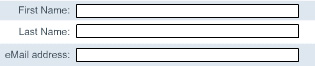
On the Stage, with the Selection tool selected, click the input text field that you created and press Alt. Drag a copy of the text field to the right of Last Name.
|
|
2.
|
Alt-click the input text field that you just dragged, and then drag the new copy of the field to eMail Address.
|
Assign instance names to text fields
An input text field on the Stage is an instance of the ActionScript TextField object, to which you can apply properties and methods. As a best practice, you should name text field instances so that you or others working on the project can refer to the instance in ActionScript.
|
1.
|
Select the input text field that you placed next to First Name. In the Property inspector, enter firstName_txt in the Instance Name text box.
|
|
2.
|
Select the input text field that you placed next to Last Name. In the Property inspector, enter lastName_txt in the Instance Name text box.
|
|
3.
|
Select the input text field that you placed next to eMail Address. In the Property inspector, enter eMail_txt in the Instance Name text box.
|
To learn more about the TextField object, see "Working with Text" in Flash Help.
by updated
