To create a reading order, you must assign a tab index to every instance in ActionScript.
If you have Flash Professional, creating a tab order is as easy as entering a number in the Tab Index text box. You can then view the tab order directly on the Stage.
To create a tab order in this lesson, use one of the following procedures. To create a reading order along with a tab order, follow the procedure to control the tab order and reading order using ActionScript.
If you have Flash Professional 8, you can follow this procedure to create a tab order using the Accessibility panel:
|
1.
|
With the Accessibility panel open, select the logo_mc instance at the top of the Stage. In the Accessibility panel, enter 1 in the Tab Index text box.
|
|||||||||||||||||||||||||||||||||||||||
|
2.
|
Continue to select each instance on the Stage and enter a tab order number in the Tab Index text box, using information from the following table:
|
If you have Flash Professional 8, follow this procedure to view a tab order:
-
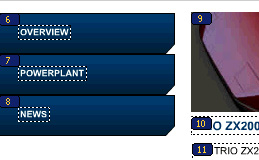
Select View > Show Tab Order.
The tab index number that you entered appears next to the instance on the Stage.
Note
A tab order created with ActionScript, rather than the Accessibility panel, does not appear when Show Tab Order is enabled.
Follow this procedure to control the tab order and reading order using ActionScript:
|
1.
|
In the Timeline, select Frame 1 of the Actions layer.
|
|
2.
|
In the Actions panel (Window > Actions), view the ActionScript that creates the tab index for each instance in the document.
|
|
3.
|
If you're using Flash Basic 8, or if you're using Flash Professional 8 and you did not create the tab index using the Accessibility panel, delete the /* and */ in the script to uncomment the script:
this.logo_mc.tabIndex = 1; this.dealers_btn.tabIndex = 2; this.orders_btn.tabIndex = 3; this.research_btn.tabIndex = 4; this.text4_txt.tabIndex = 5; this.overview_btn.tabIndex = 6; this.powerplant_btn.tabIndex = 7; this.news_btn.tabIndex = 8; this.safety_mc.tabIndex = 9; this.text8_txt.tabIndex = 10; this.text9_txt.tabIndex = 11; this.bevel_mc.tabIndex = 12; |
