- Click the red X icon in the layer named Highlight to reveal the shape in that layer. The shape appears at the top of the eight ball.
- With the Selection tool, double-click the highlight shape to edit its group.
- Select the highlight shape.
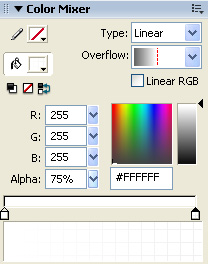
- In the Color Mixer, select Linear from the Type menu.
- Select Non-repeating from the Overflow menu.
- Drag the left gradient color swatch all the way to the left and double-click it.
- Select the color white (#FFFFFF) from the Color Picker.
- Set the Alpha value for the left swatch to 0%.
- Drag the right gradient color swatch all the way to the right and double-click it.
- Select the color white from the Color Picker.
- Set the Alpha value for the right swatch to 75%.
Your gradient settings should match those in the following illustration:
The Color Mixer with the correct settings for the gradient on the highlight shape
- With the highlight shape still selected, select the Gradient Transform tool from the Tools panel.
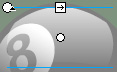
- Drag the Gradient Rotate control 90° counterclockwise.
- Drag the Gradient Scale control downward until it touches the top of the highlight shape.
The Gradient Scale control

Dragging the Gradient Scale control downward to touch the highlight shape
- Select the Selection tool from the Tools panel.
- Double-click outside the Stage twice to deselect the highlight group.
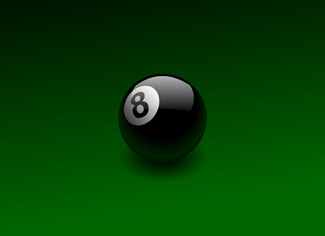
The finished Flash illustration looks like this:
- Select File > Save to save your FLA file.
Test the application
At any point during authoring, you can test how your application plays as a SWF file. Because this tutorial contains no animation or interactivity, the file will look the same in test mode as it does in authoring mode.
- Select File > Save to save your FLA file.
- Select Control > Test Movie.
- When you finish viewing the application, close the SWF file by clicking the close box in the test window.
You have now successfully applied a variety of gradients in Flash and created an attractive and realistic-looking illustration. By using the gradient tools in Flash, you can create an infinite range of visually interesting graphics and effects.
by updated
