To transform case, you use the text-TRansform property and a value of capitalize, uppercase, lowercase, or none.
To vary text, you use the font-variant property and a value of small-caps or normal (which is the default).
Example 9-6 shows a document employing transformation and variants.
Example 9-6. Transforming and varying text with CSS
<!DOCTYPE html PUBLIC "-//W3C//DTD XHTML 1.0 Transitional//EN"
"http://www.w3.org/TR/xhtml1/DTD/xhtml1-transitional.dtd">
<html xmlns="http://www.w3.org/1999/xhtml">
<head>
<title>working with style</title>
<style type="text/css">
body {font-family: Georgia, Times, serif; color: black;}
h1 {font-family: Arial, Helvetica, sans-serif; font-size: 24px;
font-variant: small-caps;}
h2 {font-family: Georgia, Times, serif; color: #999; font-size: 18px; font-style: italic;
 text-transform: lowercase;}
.accent {font-weight: 700; color: red; text-transform: uppercase;}
p {font-size: 16px; text-transform: capitalize;}
</style>
</head>
<body>
<h1>The Black Cat</h1>
<h2>By Edgar Allen Poe</h2>
<p>I married early, and was happy to find in my wife a disposition not
uncongenial with my own. Observing my partiality for domestic pets, she
lost no opportunity of procuring those of the <span class="accent">most</span>
agreeable kind. We had birds, gold fish, a fine dog, rabbits, a small monkey,
and a cat.</p>
<p>This latter was a <span class="accent">remarkably</span> large and beautiful animal,
entirely black, and sagacious to an astonishing degree. In speaking of his intelligence,
my wife, who at heart was not a little tinctured with superstition, made frequent allusion
to the ancient popular notion, which regarded all black cats as witches in disguise.</p>
<p>Pluto - this was the cat's name - was my <span class="accent">favorite</span> pet and
playmate. I alone fed him, and he attended me wherever I went about the house. It was even
with difficulty that I could prevent him from following me through the streets.</p>
</body>
</html>
text-transform: lowercase;}
.accent {font-weight: 700; color: red; text-transform: uppercase;}
p {font-size: 16px; text-transform: capitalize;}
</style>
</head>
<body>
<h1>The Black Cat</h1>
<h2>By Edgar Allen Poe</h2>
<p>I married early, and was happy to find in my wife a disposition not
uncongenial with my own. Observing my partiality for domestic pets, she
lost no opportunity of procuring those of the <span class="accent">most</span>
agreeable kind. We had birds, gold fish, a fine dog, rabbits, a small monkey,
and a cat.</p>
<p>This latter was a <span class="accent">remarkably</span> large and beautiful animal,
entirely black, and sagacious to an astonishing degree. In speaking of his intelligence,
my wife, who at heart was not a little tinctured with superstition, made frequent allusion
to the ancient popular notion, which regarded all black cats as witches in disguise.</p>
<p>Pluto - this was the cat's name - was my <span class="accent">favorite</span> pet and
playmate. I alone fed him, and he attended me wherever I went about the house. It was even
with difficulty that I could prevent him from following me through the streets.</p>
</body>
</html>
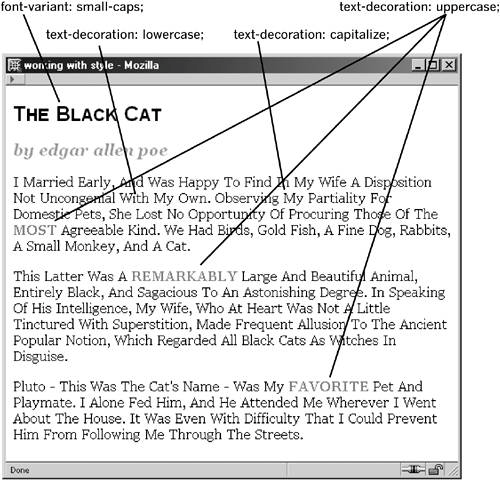
You can see how text-TRansform and font-variant work in Figure 9-13.
Figure 9-13. Transforming and varying text.
Browsers that provide full support for transforming and varying text will apply the styles regardless of the case your text is actually composed in. Of course, for sensible reasons, you'll want your text content to be treated normally in the document. This way, you can always change the styles without having to reauthor the document.
NOTE
Browser support for text-transform and font-variant is pretty good overall, but one known issue in contemporary browsers is that font-variant: small-caps; does not work in certain early versions of the popular Safari browser from Apple. The style simply won't be applied in any way, and the text will pick up only those styles that Safari does support.
