Each type of query has its own icon so that you can identify it. Table describes the different queries.
Up until now, when you thought of a query, you were actually probably thinking of a select query a particular type of query. Select queries are by far the most common and useful type of query in Access; however, there are other types of queries that are also important.
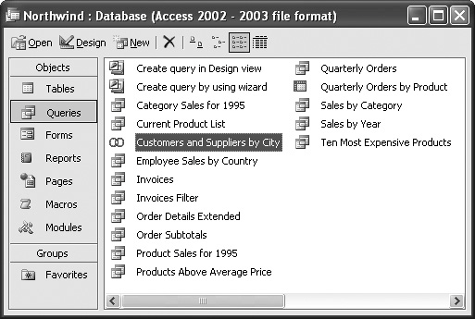
We will cover most of these query types in this tutorial, so here's a quick overview of the different types of queries you'll find in Microsoft Access. Each type of query has its own icon, as shown in figure. Table describes the different types of queries.
Types of Queries
-
REFER TO TABLE TO BE ABLE TO IDENTIFY THE VARIOUS TYPES OF MICROSOFT ACCESS QUERIES AND WHAT EACH OF THEM DOES.
Types of Queries
| Query Type | Description |
|---|---|
|
|
The most basic and common type of query, select queries find and display the data you want from one or more tables or queries. |
|
|
Prompts the user for specific information every time the query is run. |
|
|
Summarizes data in a table format that makes it easy to read and compare information. |
|
While select queries display information that matches your criteria, the following action queries do something to the data that matches your criteria such as change or delete it. |
|
|
|
Creates a new table from all or part of the data in one or more tables. Useful for backing up and exporting information. |
|
|
Appends or adds selected records from one table to another table. Useful for importing information into a table. |
|
|
Deletes selected records from one or more tables. |
|
|
Updates selected information in a table. For example, you could raise the prices on all trips to Europe by 15 percent. |
|
|
Combines fields from two or more tables or queries into one field and is written directly in SQL. |


 Append Query
 Delete Query
 Update Query
 Union Query