To import a file, just drag it from Windows Explorer into your folder list. Or you can use the menu: select File » Import to open the Import dialog box, click Add File, and then Browse to and select the Office file.
If you import a Word, Excel, or PowerPoint file, how do visitors get to it? As with any Web page, you simply create a hyperlink to the file. What happens when a visitor follows that link depends on his browser and the software he has on his system:
-
If a visitor's browsing with Internet Explorer (and has the Office program in question loaded on her system), your file opens up in the browser. (If that person has author rights (permission to edit files) on your serverwhich is unlikelyshe'll be able to edit the document in Word or Excel.)
A PowerPoint presentation opens up in the browser, and visitors can click the Page Down key to move from slide to slide. If you're worried that visitors may not have PowerPoint software or that they may not know to press Page Down to move from slide to slide, you can convert your presentation into Web pages (see Moving from word into FrontPage, later in this tutorial). Doing so creates hyperlinks a viewer can follow to see each slide, but the conversion approach comes with its own problems, which you'll read about later.
If you don't want visitors to be able to download and edit your PowerPoint presentation, open the presentation in PowerPoint and select File » Save As. Within the Save As Type drop-down list, select .pps (PowerPoint Slideshow) instead of the standard .ppt (PowerPoint Presentation). If you do so, visitors won't be able to edit your presentation.
-
If a visitor's using a non-Microsoft browser like Netscape or Firefox, then he's presented with a dialog box that lets him open the file with the program used to create it or download it (see Figure 18-1).
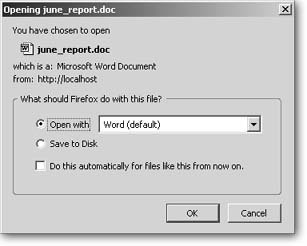
Figure 18-1. When you're using a non-Microsoft browser and you click a link to an Office filelike this Word documentyou can choose to open it using Word or click the drop-down menu to select another program with which to open it. You can also download the file onto your computer.
Microsoft offers free viewers for each of its Office programs. The viewers let anyone who doesn't own a particular program view the files produced by that program. However, some of these viewers are pretty hefty and may take quite a while to download, which may discourage lots of visitors. You'll lose those folks who are unwilling to install additional software just to see files on your site. If you're still game, you can download these viewers from http://office.microsoft.com/downloads/. (In the Downloads search box that appears at the top of the page, type in "viewers" and click Go to see a list of all Office program viewers.)
Posting Files for Download
If you want visitors to download Office files, Internet Explorer may throw a wrench in your plans. As you've read, IE automatically opens Office files within the browser window.
If you want visitors to download them instead, you have two options:
-
Place the file in a ZIP file (see the note below) and provide a link to it. Browsers automatically prompt a visitor to download a ZIP file. Of course, your visitors will need to know how to unzip the file.
Don't know what a ZIP file is? ZIP files are compressed versions of any type of computer file, or even a group of computer files. When you zip a file, it not only takes up less space (so it's easy to email and store), it also lets you package a group of files together and send or post them as a single file. To learn more, check outwww.winzip.com.
-
Place some instructions on your page to help viewers download on their own. For example, link to a Word, Excel, or PowerPoint file and above the hyperlink, add text that says something like "To download this file, right-click the link below. Then select 'Save Target As' and browse to the folder in which you'd like to save it."
Converting Files to PDF Format
Often, the most expedient way to get your Office documents up on the Web is to convert them to PDFs (short for Portable Document Format). Converting an office file into a PDF file is like taking a snapshot of it. For example, if you turn a Word file into a PDF file, anyone who opens it will see all the fonts, alignment, spacing, and pictures appear just as the Word author originally intended, even if a viewer doesn't have Microsoft Word on her system. All she needs is Adobe Reader (which comes preinstalled on most computers or can be downloaded for free at www.adobe.com/products/acrobat/readstep2.html). To generate a PDF, you'll need to purchase Adobe Acrobat (the souped-up version of Reader). Once you install it, you can create PDF documents within any program that prints. (Acrobat automatically adds menu and toolbar options that make this a snap.)
