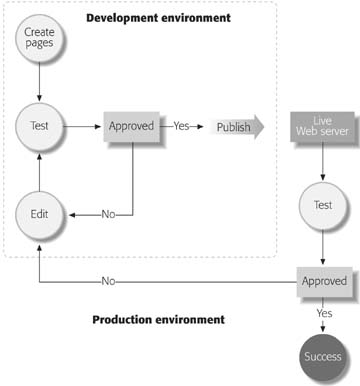
Figure: Here's an overview of the basic steps you'll follow to launch your Web site. First, you create your pages and test them in your development environment. If you like what you see, you're ready to publish your workin other words, you tell FrontPage to send your site up to a live Web server connected to the Internet. Then, you test your pages again, to make sure that they look the same and work just as well in your live production environment. (They'd better that's where the world can see them.) If there's a problem, you return to your development environment, make some edits, and publish again. Once you've got everything working well and looking fabulous up on the production server, you're a success. Simple as that.
If your site is a plain-vanilla affair simple pages of text and pictures, employing basic HTML you don't have to be too discriminating about who you pick as your Web host. That's because your Web pages are pretty self-sufficient: all they need is some Web-based food and shelter, and they'll work just fine. But if you've included more advanced features (like letting visitors search your site, collecting information through forms, or displaying data from a database), you'll need to make sure the server you use is loaded with at least one of the Microsoft Web server technologies described on the following pages. It's easy to find out. Generally, Web-hosting companies advertise the availability of the FrontPage-related software you're about to read about. If not, just ask before you choose a provider.
The Microsoft Web Server Technologies
Microsoft's Web server technologies (special software that lives on your live Web server) enable some special FrontPage Web site features to work. The Microsoft Web technologies fall into two basic camps: FrontPage Server Extensions and SharePoint Services.
FrontPage Server Extensions
FrontPage Server Extensions (FPSE) are a set of program files that enable a Web server to provide some FrontPage-specific services, like adding forms or a site search to your site.
Previously, Microsoft released a new version of the server extensions to support each new version of FrontPage. However, with the release of FrontPage 2003, Microsoft made no improvements to the server extensions. The company still supports FPSE 2002, but its focus is now centered on SharePoint Services, a new and improved server technology, which you'll read about next.
However, your FrontPage 2003 Web site is still compatible with FrontPage Server extensions, and in fact, many features still rely only on FPSE. But, some new advanced data-manipulation tools work only with SharePoint Services. Confused yet? Table on next heading provides a list of Web features and the server-side technology that supports them.
Windows SharePoint Services
Windows SharePoint Services (WSS) has taken over where FPSE left off. SharePoint is a souped-up, all-around more capable server extension that lets you perform fancy maneuvers like integrating live data sources into your site.
If you'll be working with a lot of data, or want to use XML (Extensible Markup Language, another type of publishing language that structures and organizes data in a file), SharePoint brings a lot more to the table than FPSE. But again, some Web functions still work only with FPSE and not with SharePoint. Think about what you want your site to do, and use Table to help figure out whether you need FPSE or SharePoint on your Web server.
A lot of large organizations use Windows SharePoint Services to create large Web sites that let their staffs share information quickly and easily. In this sense, Windows SharePoint Services has taken over where SharePoint Team Services (which you'll read about next) left off. In fact, with SharePoint, you don't even need FrontPage to create a site like this.
To use Windows SharePoint Services, the Web server you're using needs to be running Windows Server 2003.
SharePoint Team Services
Both FPSE and WSS work for the benefit of your Web site: they carry out their duties behind the scenes so that visitors to your site never actually interact with either of these programs. By contrast, SharePoint Team Services (STS) is purely a self-contained Web program that, say, members of a large staff would use to communicate with one another. STS is essentially an intranet in a box that lets you create sites in which visitors can add and edit page content directly through their browser windows. (See the box "Net Differences" for more on intranets.)
A SharePoint Team site includes things like discussion lists and document libraries, which let many different people see and edit content. You don't need FrontPage to create or edit SharePoint Team Web pages. Because SharePoint Team Services is its own separate program, independent of FrontPage. You can't actually purchase SharePoint Team Services anymore. Microsoft now encourages you to use Windows SharePoint Services to create team sites. However, the presence of SharePoint Team Services supports some special Web site features that SharePoint Services doesn't. Also, some FrontPage owners may still be working on a SharePoint Team site, so it's included in Table.
Feature Support from Microsoft Web Server Technologies. These features are available only when you or your Web-hosting company have installed FPSE or SharePoint on your Web server.
|
Feature |
FPSE |
WSS |
STS |
|---|---|---|---|
|
Top 10 Lists |
Yes |
Yes |
Yes |
|
Hit Counter |
Yes |
No |
Yes |
|
Save Form Results to E-mail or a File |
Yes |
Yes |
Yes |
|
Site Usage Reports |
Yes |
Yes |
Yes |
|
User Registration template |
Yes |
Yes |
Yes |
|
Database Results/Interface wizards |
Recommended |
No |
Yes |
|
Save Results to Database |
Yes |
No |
Yes |
|
Search Current Web |
Yes |
No |
Yes |
|
Full Text Search |
No |
Yes |
Yes |
|
Table of Contents |
Yes |
No |
Yes |
|
Search Form and Table of Contents options for various wizards |
Yes |
Yes |
Yes |
|
Include Page or Picture Based on Schedule |
Yes |
No |
Yes |
|
Table of Contents template |
Yes |
No |
Yes |
|
Bulletin Boards/Discussion Groups |
No |
Yes |
Yes |
|
Survey |
No |
Yes |
Yes |
|
Document libraries |
No |
Yes |
Yes |
|
Modify rules for document libraries |
No |
No |
Yes |
|
Data Source Catalog |
No |
Yes |
No |
|
Data View Features |
No |
Yes |
No |
|
XML Support |
No |
Yes |
No |
|
Web Packages |
No |
Yes |
No |
|
Web Parts |
No |
Yes |
No |
Although FPSE don't support the advanced Discussion Group feature available under SharePoint, FrontPage does offer a Discussion Web site that works fine with FPSE.
What's an intranet? What's an extranet? For starters, you've of course heard of the Internetthe world-wide network that lets millions of computers all over the world speak to one another.
An intranet is a private Web network that exists behind a firewall (a protective tool that keeps out unknown network traffic and visitors). Many corporations and universities have created vast intranets that help their members share and send information quickly and easily. These networks are not available to the public.
An extranet is a special portion of an intranet that's accessible to outside visitors. These outsiders can only gain access with a user name and password. Companies often use extranets to share select information with clients. For instance, imagine you're a lawyer. You might share information with other attorneys on your firm's intranet. But if you wanted to show a client a document, you'd post it on an extranet and tell them how to access it.
