The Problem:
I'd like my table to take up the full text width of the page. But whenever I change the page margins, I need to change the width of the table manually to match.
The Solution:
Right-click the table, choose Table Properties, click the Table tab, check the "Preferred width" box, choose "Percent" in the "Measure in" drop-down list, and specify 100% in the middle drop-down list. Word will then change the table's width automatically when you change the margins of the page.
Restore the Cell Height and Width Dialog Box
The Problem:
I guess I'm still stuck in the Dark Ages of Word 97, because I miss the Cell Height and Width dialog box that you could use towellcontrol the height and width of a cell. It didn't offer all the fancy options of the Table Properties dialog box, but it was easy enough for me to understand.
The Solution:
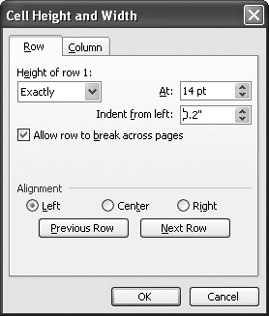
You can still use the Cell Height and Width dialog box (see Figure 7-5) if you want. To pop it up just once for old times' sake and see if it matches up to your memories, choose Tools » Macro » Macros, type tableformatcell, and press Enter. To use it more frequently, choose Tools » Customize, click the Commands tab, check that Normal.dot is selected in the "Save in" drop-down list, click All Commands in the Categories list, and drag the TableFormatCell item from the Commands list to your Table menu or other preferred location. After closing the Customize dialog box, Shift-click the File menu, choose Save All, and save the changes to Normal.dot if prompted.
Figure 7-5. Word 2000 and later versions suppress the Cell Height and Width dialog box, but dissenters like you can liberate it if you choose.