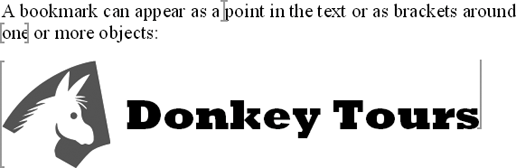
Choose Tools » Options, click the View tab, check the Bookmarks box, and click the OK button. Bookmarks that have contents appear with brackets around them (see Figure 3-15). Bookmarks that are just points appear as heavy I-beams.
Figure 3-15. Turn on bookmarks if you're in danger of deleting them accidentally.
Place the Insertion Point Outside a Bookmark
Okay, explain this. I select a paragraph, choose Insert » Bookmark, and create a bookmark around the paragraph. I turn on the display of bookmarks so I can see where the bookmark starts and ends. I need to add a paragraph before the one containing the bookmark, so I put the insertion point at the beginning of that paragraph and press Enter... and Word puts the new paragraph inside the bookmark rather than moving the bookmark down a paragraph. Arrgh!
If you look closely, you may see that Word displays the insertion point within the bookmark brackets around the paragraph, in a brave attempt to show you what's happening. Anyway, the problem is that you've set the bookmark's range to encompass the whole paragraph, and when you place the insertion point at the beginning of the paragraph, Word considers it to be within the bookmark. To add a paragraph, you must place the insertion point at the end of the previous paragraph so that it's outside the bookmark.
If you've put the bookmark at the start of the document, you can't place the insertion point before it. Type the paragraph, select the paragraph that's supposed to contain the bookmark, choose Insert » Bookmark, and create the bookmark again.
