The Problem:
So I'm working in my document, and I need to use several views. I choose View » Outline...choose View » Normal...choose View » Print Layout...choose again.... It seems like I'm addicted to the View menu. I'd like to get off it.
The Solution:
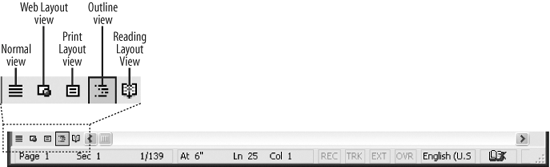
Easy enough. If you still have the horizontal scrollbar displayed, click the appropriate button at its left end to change views (see Figure 3-2). You can also press Ctrl+Alt+O for Outline view, Ctrl+Alt+N for Normal view, Ctrl+Alt+P for Print Layout view, or Ctrl+Alt+I for Print Preview.
Figure 3-2. The horizontal scrollbar provides buttons for changing views quickly. If you prefer to hide the horizontal scrollbar, you can use keyboard shortcuts instead to change the view.
Learn to Live with the Wavy Under-line
The Problem:
In Word 97, in Outline mode (View » Outline), every collapsed heading has a wavy underline that starts about 0.5 inches to the left of the first word and extends approximately 1.5 inches (for short headings) to 4 inches (for longer ones) to the right. How can I get rid of the underlining? It's ugly and appears to serve no purpose.
The Solution:
Sorryno fix on this one. There is a purpose, though: the underlining is to indicate that there are paragraphs collapsed under the heading. Treat it as a visual aid to help you avoid deleting precious pages when you intend to delete only a heading.
