Perhaps now might be a good time to explain quickly the rules of the game-it's similar to Blackjack, or 21. The player plays against the computer (dealer) with the aim of attaining a score of 21. If the score goes over 21, the game is lost. The player can choose to be dealt another card, ("twist"), and his or her score is calculated as a sum of the face values of all the player's cards. The ace has a face value of 11 and picture cards have a face value of 10. If the player decides that another card might bring his or her score over 21, he or she might decide to not take anymore cards ("stick"). After a player chooses to stick, all subsequent cards will be dealt to the dealer. If the dealer reaches a score higher than the player's and below 22, the dealer wins. But if the dealer's score exceeds 21, the dealer loses. Before the player makes the first twist he or she must select an amount to gamble. If the game is lost, the player's funds are deducted by that amount. If the player wins, his or her funds are increased by the amount gambled..
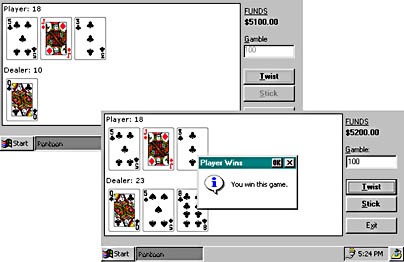
Figure 5-8 The Pontoon Windows CE card game in action-I got lucky this time!
General Design Considerations
Building a Windows CE application is essentially a compromise of various factors, more so in Visual Basic because of the small subset of available programming constructs. The common factors that you will need to consider are size, memory, maintainability, and stability. All these factors together determine the quality of the application as shown in Figure 5-9.

Figure 5-9 Design factors in a Windows CE application
For my Pontoon game, the primary goals are good maintainability and small size. Various techniques are used to reduce the program size while trying to keep it reasonably understandable and maintainable; however, this may result in a loss in performance and perhaps in robustness. But the losses are not so great because stability is not a major concern. We can code to avoid obvious errors, but if an error does occur, at worst the user will get an error message. Speed is not really important here because the actual processing cycles are relatively small.
