XML DSO Events
| Event | Description |
|---|---|
| ondataavailable | Raised when data comes in from the data source |
| ondatasetcomplete | Raised when all the data has arrived from the data source |
| ondatasetchanged | Raised when data changes |
| onreadystatechange | Raised when the readystate property of the DSO changes |
| onrowenter | Raised when a row is entered |
| onrowexit | Raised for a recordset before another row is entered |
| onrowsdelete | Raised when rows are about to be deleted from the current recordset |
| onrowsinserted | Raised after rows are inserted into the current recordset |
| oncellchange | Raised when the data in a bound control or table cell has been changed and the focus has been moved away from the cell |
You can use these events to manage XML data in the DSO object. In addition to these events, new properties associated with the event object can also be used within the DSO events. The following table shows the new properties associated with the event object:
Properties Associated with the Event Object
| Property | Description |
|---|---|
| bookmarks | Returns a collection of bookmarks that identify the records being inserted or deleted. It can also contain cells that have been changed. |
| boundElements | Returns a collection of elements in the HTML page that are bound to the DSO and have raised the event. |
| dataFld | Returns the name of the column or field in the ADO recordset that was affected by an oncellchanged event. Thus, it can be used in the oncellchanged event to identify which field has been changed. |
| recordset | Returns a reference to the ADO recordset that is bound to the DSO that raised the event. |
Let's look at an example that uses DHTML, XML data located in a data island, and the DSO. We will rewrite the NorthwindPO.XML file as follows:
  <?xml version="1.0" standalone="yes" ?>
  <POLine>
     <Item>
        <partno>pc1010</partno>
        <qty>200</qty>
        <uom>EACH</uom>
        <unitPrice>800.00</unitPrice>
        <discount>10</discount>
        <totalAmount>144000.00</totalAmount>
     </Item>
     <Item>
        <partno>monitor17</partno>
        <qty>200</qty>
        <uom>EACH</uom>
        <unitPrice>300.00</unitPrice>
        <discount>20</discount>
        <totalAmount>48000.00</totalAmount>
     </Item>
     <Item>
        <partno>pc2010</partno>
        <qty>100</qty>
        <uom>EACH</uom>
        <unitPrice>1200.00</unitPrice>
        <discount>10</discount>
        <totalAmount>108000.00</totalAmount>
     </Item>
     <Item>
        <partno>monitor19</partno>
        <qty>100</qty>
        <uom>EACH</uom>
        <unitPrice>500.00</unitPrice>
        <discount>10</discount>
        <totalAmount>45000.00</totalAmount>
     </Item>
  </POLine>
In the above code, the four items represent one order that includes four items. We will now create the following HTML document:
  <html>
      <head>
      <xml src="NorthwindPO3.xml" id="NorthwindDSO"></xml>
          <style type="text/css">
              .FieldName  {font-family:Arial,sans-serif;
              font-size:12px; font-weight:normal}
              .DataButtons {behavior:url (MoveButtons.htc);}
          </style>
  <script language="vbscript">
  <!--
  Sub NorthwindDSO_ondatasetcomplete()
  End Sub
  Sub UpdateTextBoxes()
      txtPartNo.value=NorthwindDSO.recordset.Fields("partno")
      txtQuantity.value=NorthwindDSO.recordset.Fields("qty")
      txtUOM.value=NorthwindDSO.recordset.Fields("uom")
      txtUnitPrice.value=NorthwindDSO.recordset.Fields("unitPrice")
      txtDiscount.value=NorthwindDSO.recordset.Fields("discount")
      txtTotal.value=NorthwindDSO.recordset.Fields("totalAmount")
  End Sub
  Sub MoveNext()
      NorthwindDSO.Recordset.MoveNext
      If NorthwindDSO.Recordset.EOF Then
          NorthwindDSO.Recordset.MoveFirst
      End If
      UpdateTextBoxes
  End Sub
  Sub MovePrevious()
      NorthwindDSO.Recordset.MovePrevious
      If NorthwindDSO.Recordset.BOF Then
          NorthwindDSO.Recordset.MoveLast
      End If
      UpdateTextBoxes
  End Sub
  Sub MoveLast()
  If (Not NorthwindDSO.Recordset.EOF) And _
      (Not NorthwindDSO.Recordset.BOF) Then
          NorthwindDSO.Recordset.MoveLast
      End If
      UpdateTextBoxes
  End Sub
  Sub MoveFirst()
  If (Not NorthwindDSO.Recordset.EOF) And _
      (Not NorthwindDSO.Recordset.BOF) Then
          NorthwindDSO.Recordset.MoveFirst
      End If
      UpdateTextBoxes
  End Sub
  -->
  </script>
  </head>
      <body>
          <table  cellpadding="5">
              <tr>
                  <td>
                      <div class="FieldName">Part No</div>
                  </td>
                  <td>
                      <div class="FieldName">
                          <input id="txtPartNo" name="txtPartNo">
                      </div>
                  </td>
              </tr>
              <tr>
                  <td>
                      <div class="FieldName">Quantity</div>
                  </td>
                  <td>
                      <div class="FieldName">
                          <input id="txtQuantity"
                              name="txtQuantity">
                      </div>
                  </td>
              </tr>
              <tr>
                  <td>
                      <div class="FieldName">UOM</div>
                  </td>
                  <td>
                      <div class="FieldName">
                          <input id="txtUOM" name="txtUOM"></div>
                  </td>
              </tr>
              <tr>
                  <td>
                      <div class="FieldName">Unit Price</div>
                  </td>
                  <td>
                      <div class="FieldName">
                          <input id="txtUnitPrice"
                              name="txtUnitPrice">
                      </div>
                  </td>
              </tr>
              <tr>
                  <td>
                      <div class="FieldName">Discount</div>
                  </td>
                  <td>
                      <div class="FieldName">
                          <input id="txtDiscount"
                              name="txtDiscount">
                      </div>
                  </td>
              </tr>
              <tr>
                  <td>
                      <div class="FieldName">Total</div>
                  </td>
                  <td>
                      <div class="FieldName">
                          <input id="txtTotal" name="txtTotal">
                      </div>
                  </td>
              </tr>
          </table>
          <table>
              <td><input id="cmdRetrieveData" name="cmdRetrieveData"
                  type="button" value="Retrieve Data"
                  onClick="UpdateTextBoxes" ></input></td>
              <td><input id="cmdMoveNext" name="cmdMoveNext"
                  type="button" value="Move Next"
                  onClick="MoveNext" ></input></td>
              <td><input id="cmdMovePrevious" name="cmdMovePrevious"
                  type="button" value="Move Previous"
                  onClick="MovePrevious" ></input></td>
              <td><input id="cmdMoveFirst" name="cmdMoveFirst"
                  type="button" value="Move First"
                  onClick="MoveFirst" ></input></td>
              <td><input id="cmdMoveLast" name="cmdMoveLast"
                  type="button" value="Move Last"
                  onClick="MoveLast" ></input></td>
          </table>
      </body>
  </html>
Figure 13-6 shows what this document looks like in Internet Explorer 5.
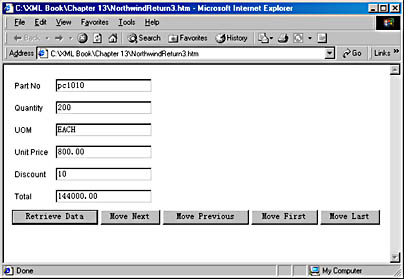
Figure 13-6. A Web-based user services component for viewing data.
As you can see, subroutines written in Visual Basic were added to the code that will use the XML DSO to move the recordset. These subroutines have been associated to the onClick events of the buttons. This is how DHTML code is normally written.
In this example, you did not bind the XML DSO to any of the text boxes. Instead, you used DHTML code and the DSO to fill the text boxes using the UpdateTextBoxes function. The move functions all perform the appropriate move and then call the UpdateTextBoxes to update the text boxes.
Summary
Using DHTML and the XML DSO, you can create dynamic Web-based user services components that use XML. Since DHTML runs on the client machine, it can manipulate the user services components without making a trip to the Web server. The DHTML object model provides access to the components of the Web documents. Combined with the events associated with DHTML objects, this access enables Web developers to create Web applications that contain executable scripts and react to user input. DHTML Behaviors make DHTML functionality more accessible and easier to use in a document. You can also use XML DSO to bind XML data to HTML elements so that you can display the elements and attributes contained in the XML data.
In Chapter 14, we will use DHTML and HTCs together to create client-side business services components that can validate user input.
