The second addition to the panel in this step is the calculation and conditional display of results. We introduce a new feature to the panel that calculates the savings in buying a dozen bottles and shows the user the per-bottle saving of buying a case of wine, but only when there is such a saving. We don't deal with the situation where a case costs more than 12 single purchases.
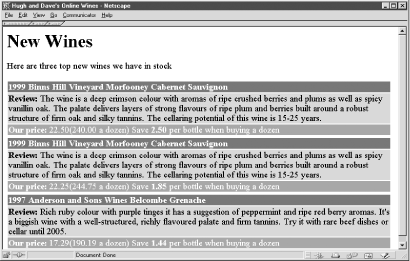
The script showing these two new concepts is in Example 4-10. The script improves on Example 4-9 by removing the first two limitations identified in the last section. The output of Example 4-10 is shown in Figure 4-4.
Figure 4-4. Adding wine varieties and discounts to the panel
Example 4-10. An improved display with varieties and the dozen-bottle discount
<!DOCTYPE HTML PUBLIC
               "-//W3C//DTD HTML 4.0 Transitional//EN"
               "http://www.w3.org/TR/html4/loose.dtd">
<html>
<head>
  <title>Alexa and Dave's Online Wines</title>
</head>
<body bgcolor="white">
<h1>New Wines</h1>
Here are three top new wines we have in stock
<br><br>
<?php
   include 'db.inc';
   include 'error.inc';
   // Print out the varieties for a wineID
   function showVarieties($connection, $wineID)
   {
      // Find the varieties of the current wine,
      // and order them by id
      $query = "SELECT gv.variety
                FROM grape_variety gv,
                     wine_variety wv, wine w
                WHERE w.wine_id = wv.wine_id
                AND wv.variety_id = gv.variety_id
                AND w.wine_id = $wineID
                ORDER BY wv.id";
      // Run the query
      if (!($result = @ mysql_query($query, $connection)))
         showerror(  );
      // Retrieve the varieties ...
      while ($row = @ mysql_fetch_array($result))
         // ... and print each one
         echo " " . $row["variety"];
   }
   // ---------
   $query = "SELECT wi.winery_name,
                     i.cost,
                     i.case_cost,
                     w.year,
                     w.wine_name,
                     w.description,
                     w.wine_id
             FROM wine w, winery wi, inventory i
             WHERE w.description != \"\"
             AND w.winery_id = wi.winery_id
             AND w.wine_id = i.wine_id
             ORDER BY i.date_added DESC LIMIT 3";
   // Open a connection to the DBMS
   if (!($connection = @ mysql_connect($hostName,
                                       $username,
                                       $password)))
      die("Could not connect to database");
   if (!mysql_select_db($databaseName, $connection))
      showerror(  );
   // Run the query created above on the database through
   // the connection
   if (!($result = @ mysql_query ($query, $connection)))
      showerror(  );
   echo "\n<table border=\"0\">";
   // Process the three new wines
   while ($row = @ mysql_fetch_array($result))
   {
      // Print a heading for the wine
      echo "\n<tr>\n\t<td bgcolor=\"maroon\">" .
           "<b><font color=\"white\">" .
           $row["year"] . " " .
           $row["winery_name"] . " " .
           $row["wine_name"] . " ";
      // Print the varieties for this wine
      showVarieties($connection, $row["wine_id"]);
      echo "</font></b></td>\n</tr>";
      // Print the wine review
      echo "\n<tr>\n\t<td bgcolor=\"silver\">" .
           "<b>Review: </b>" .
           $row["description"] .
           "</td>\n</tr>";
      // Print the pricing information
      echo "\n<tr>\n\t<td bgcolor=\"gray\">" .
           "<b>Our price: </b>" .
           $row["cost"] .
           "(" . $row["case_cost"] . " a dozen)";
      // Calculate the saving for 12 or more bottle
      $dozen_saving = $row["cost"] - ($row["case_cost"]/12);
      // If there's a saving, show what it is
      if ($dozen_saving > 0)
         printf(" Save <b>%.2f</b> per bottle when
                  buying a dozen\n", $dozen_saving);
      echo "</td>\n</tr>";
      // Blank row for presentation
      echo "\n<tr>\n\t<td></td>\n</tr>";
   }
   echo "\n</table>\n";
   if (!mysql_close($connection))
      showerror(  );
?>
</body>
</html>
by updated
