|
1.
|
In the Tools panel, select the Free Transform tool. Double-click the hexagon on the Stage to select both the stroke and the fill.
|
|
2.
|
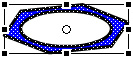
Drag the upper-middle handle of the Free Transform tool down to transform the hexagon into the following shape:
|

Copy strokes
You can select and copy strokes, which you'll do now to create the lower edge of the bolt.
|
1.
|
With the Selection tool, click anywhere on the Stage or workspace, away from an object, to deselect the shape.
|
|
2.
|
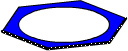
Shift-click the three lines of the shape on the Stage that comprise the bottom of the hexagon to select them, as shown in the following illustration:
|
|
3.
|
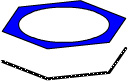
Press Shift+Alt and drag down slightly to drag a copy of the three lines, as in the following illustration:
|
by updated