Setting the Default Value property for a control
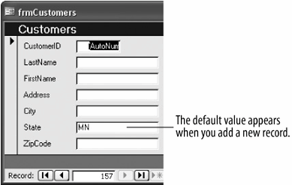
The default value will appear in the control when you add a new record with the form.
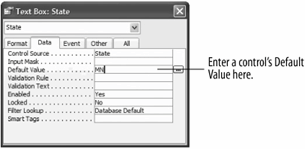
You can enter a default value to specify a value that is automatically entered in a field when a new record is created. For example, if most of your clients are from Texas, you could set the default value for the State field to "TX." When users add a record using a form, they can either accept the "TX" default value for the State field or enter their own value.
-
Open the frmCustomers form in Design view.
Since the majority of your customers are from Minnesota, you decide to add "MN" as the default value for the State field.
-
Click the State field, display its properties by clicking the Properties button on the Form Design toolbar, and click the Data tab.
Now you can add a default value to the State field.
-
Click the Default Value box and type
MN, as shown in figure.Let's see how the new default-value property works.
-
Click the Close button to close the Properties dialog box and click the View button on the Form Design toolbar to switch to Form view.
You will need to add a new record in order to see any default values.
-
Click the New Record button on the Record Navigation bar.
Access adds a new blank record to the form. Notice that the State field already contains the "MN" default value, as shown in figure. If the customer is from another state, you can simply replace the default value with your own data.
-
Click the Close button to close the frmCustomers form and click Yes to save your changes.
One more important note about form control properties: Control properties in a form are inherited, or passed down, from the original properties in the underlying table or query. For example, if you set the Default Value property for a table's State field to "TX," the "TX" Default Value property will be passed on to a related State control on a form by default.
TO SET A CONTROL'S DEFAULT VALUE:
-
DISPLAY THE FORM IN DESIGN VIEW.
-
DISPLAY THE PROPERTIES FOR THE DESIRED CONTROL.
-
CLICK THE DATA TAB.
-
CLICK THE DEFAULT VALUE BOX AND TYPE THE DEFAULT VALUE YOU WANT TO APPEAR FOR NEW RECORDS.
-
CLOSE THE PROPERTIES DIALOG BOX.
