FrontPage makes it easy to create external style sheets and even provides some templates for you to use. Below are the basic steps for creating an empty style sheet. In the next section, you'll learn how to add styles to your sheet.
Creating a New Style Sheet
A style sheet is just a plain old text file that contains a bunch of style rules. You could open a file in Notepad, start typing in style rules, and save it as a CSS file, but FrontPage makes it easier than that.
To get started, first select File » New to display the New task pane. Within the task pane, click "More page templates" and then click the Style Sheets tab. FrontPage offers some canned CSS files here that are already filled with styles. To read their descriptions, click once on each template. To create a blank style sheet, click Normal Style Sheet. A blank page appears within the document window. The next section explains how to add styles to your sheet, which will eventually look like the one shown in Figure 7-1.
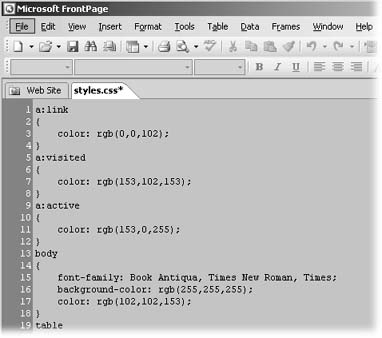
Figure 7-1. A style sheet looks likeand in fact isa regular text file. If you're comfortable writing your own style rules, you can type in a new style setting directly onto the style sheet. Otherwise, use the Styles dialog box (Creating Styles).
When you're done creating your style sheet, save the file in your Web site. To do so, select File » Save or press Ctrl+S. If it's going to be the only style sheet in your site, name it something like styles.css. If you'll have multiple style sheets, pick a more descriptive name, so you can identify it easily when you link it to various HTML pages. It's also a good idea to create a folder named css to store all your styles sheets in.
