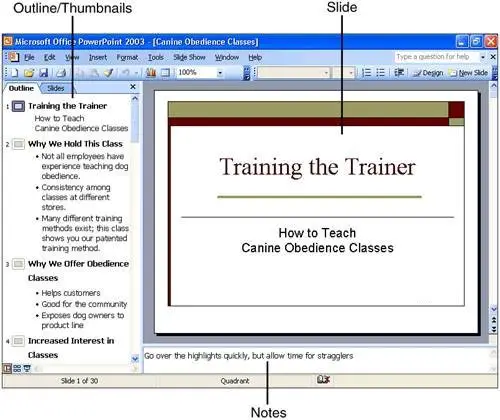
Figure 1 illustrates a PowerPoint presentation made up of 30 slides. The default (Normal) view includes notes attached to the current slide, and a navigation panel on the left side that allows you to switch between a text outline and slide thumbnails.
Figure 1. PowerPoint's Normal view includes most of the information you need to assemble a presentation.
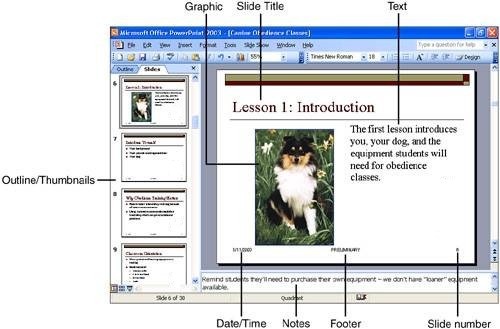
A fully loaded slide (see Figure 2) includes at most six parts:
Figure 2. All the components of a PowerPoint slide are shown here, with slide thumbnails in place of a text outline.
-
The title, which usually sits at the top of the slide.
-
Body text, the main part of the slide. More often than not, the text on a slide consists of a series of bulleted or numbered items. However, you can enter any kind of text in this part of a slide bullets and numbers are not required.
-
Some slides contain content in addition to text. You can add charts, tables, pictures, diagrams, and video clips to help illuminate your presentation.
Note
Text and content sit inside resizable and movable containers called placeholders, which you can see if you click the text or graphic in the slide pane. PowerPoint help screens sometimes refer to the placeholder and the text or content it contains as a "text object" or a "graphic object."
-
If you choose to display the date and time, these items appear at the lower-left corner by default.
-
The footer, another optional element, appears by default at the bottom of the slide, in the middle.
-
Finally, you can choose to display a slide number; its default position is in the lower-right corner.
Most presentations begin with a title slide, which typically includes the title of the presentation, the speaker's name, and other introductory details. If you're planning a presentation as a class project, you might include the class name and number Sociology 101, for instance; for a presentation to a business or civic group, you might include your name and the name of the organization you represent. Other slides in a presentation can also be title slides you might use a title slide to introduce different portions of a long presentation, for example but in most cases, you'll have just one title slide in a presentation, and it will serve as the first slide.
Note
Don't be confused by the terminology. A title slide is, in most cases, a slide that introduces a presentation. A slide title, on the other hand, is usually the first line on a slide.
