The Problem:
I need to set up a document that uses the text from the current Heading 1 paragraph as part of the header.
The Solution:
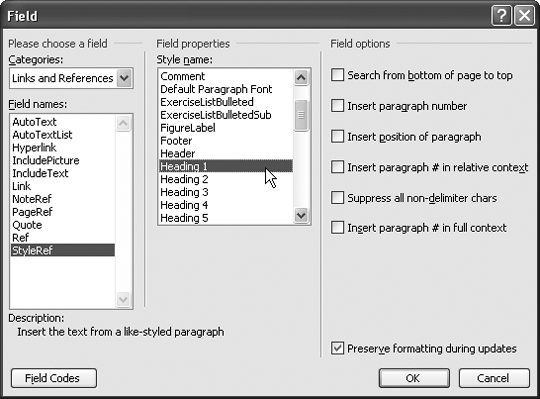
Easy enough. Choose View » Header and Footer, position the insertion point where you need the text, and choose Insert » Field to display the Field dialog box. In the Categories drop-down list, select Links and References, and then select StyleRef in the "Field names" list. Choose the style in the "Style name" list (see Figure 4-20), and click the OK button. In Word 2000, you need to click the Options button in the Field dialog box, click the Styles tab, and then select the style.
Figure 4-20. Use a StyleRef field to put the text from the nearest heading of a specified level in the header or footer.
Divide a Page into Multiple Pages
The Problem:
I can't divide a page into multiple pages in Word (e.g., quarters: 4 "pages" to an 8.5" x 11" page), as can easily be done in WordPerfect. I can create a "custom size," but to divide a page into quarters, I have to create a table with multiple columns to create the interior margins and adjust the page margins for the outside marginsa royal pain.
The Solution:
How satisfactory a fix this is will depend on exactly what you're doing, but one possibility is to create one page to a page and then print multiple pages on the same piece of paper: choose File » Print and specify your other printing options as usual, but then choose "4 pages" (or another suitable setting) in the "Pages per sheet" drop-down list before you click the OK button.
