Reading the information in is a very easy task: For form data submitted via GET (that is, in the Uniform Resource Identifer [URI] of the page requested), the data can be found in $_GET[<value of name attribute of form field>]. However, this is only the beginning. Suppose a user fills out a form but forgets one field. Instead of presenting an error message and asking the user to click the browser's Back button, the user can expect a form in which all fields are filled in with the values that he previously provided. You must not forget the special encoding of the form field values; otherwise, the form is subject to Cross-Site Scripting (XSS) attacks or, at least, could look ugly.
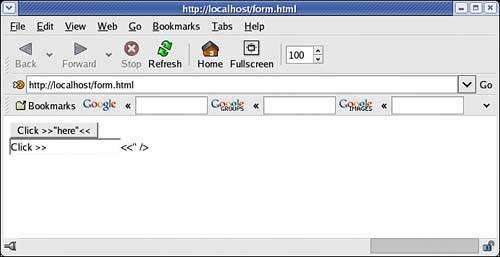
Figure 4.1 demonstrates this: You see two buttons with the same caption; however, only the first button's caption was encoded correctly in the HTML code.
Figure 4.1. Correct encoding of special characters is mandatory.
Other important topics of interest include Hypertext Transfer Protocol (HTTP) file uploads and coping with the various settings in php.ini or elsewhere that might boycott the good intentions of the developer.
Sending Form Data Back to the Current Script
<form action="<?php echo htmlspecialchars($_SERVER
['PHP_SELF']); ?>">
</form>
All relevant browsers send back form data to the current page, if no action attribute is provided in the <form> element. However, the HTML and the Extensible Hypertext Markup Language (XHTML) specifications both state that action is a required attribute (marked as #REQUIRED in the Document Type Definitions [DTDs]). The behavior of the user agent is undefined, as the HTML specification at http://w3.org/TR/html4/interact/forms.html#adef-action explains. Therefore, it's a good idea to specifically provide the uniform resource locator (URL) of the current script as the form's action. the code above does this and also escapes special characters in $_SERVER['PHP_SELF'] for security reasons.
