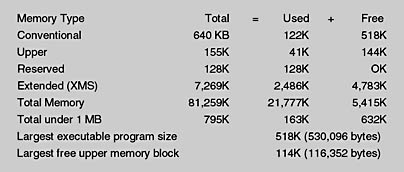
Figure 7.13 MEM.COM
Most MS-DOS and many early Windows systems load numerous device drivers and TSR (terminate-and-stay resident) programs using the CONFIG.SYS and AUTOEXEC.BAT routines during the boot cycle. These programs are, by default, loaded into conventional memory, taking up valuable space. Memory management techniques are used to load these device drivers and TSRs into the upper memory, allowing more lower memory to be made available to applications.
To determine which device drivers and TSRs are loaded, use the command:
MEM/C
The "/c" is a classify switch. This determines how much conventional memory a certain real-mode program is using (see Figure 7.14).
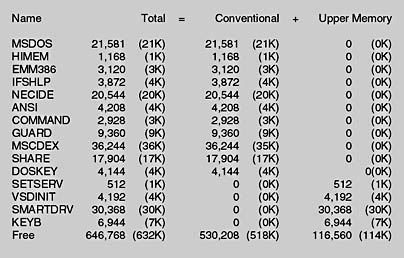
Figure 7.14 MEM/C
You can also use the Memory button provided with MSD.EXE (Microsoft Diagnostics) to determine the amount and allocation of memory (see Figure 7.15).
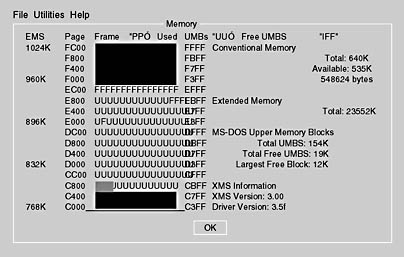
Figure 7.15 Microsoft Diagnostics
NOTE
Hexadecimal notation is used by Microsoft Diagnostics. U represents areas of the UMA which are used by TSRs and device drivers.
Lesson Summary
The following points summarize the main elements of this lesson:
Hexadecimal notation is used as shorthand for writing binary numbers.
Memory is defined in terms of the physical characteristics of the chips and how the memory is allocated for use.
The MS-DOS operating system can address only the first 1 MB of memory.
Expanded memory was an early method of adding memory to an MS-DOS-based system. It paged, or swapped, 64-KB chunks of data through a window (a 64-KB block of memory in the upper memory area) to an expansion card.
Extended memory, used by Windows 3.x and newer systems, allows the addressing of memory above the MS-DOS limit and has virtually replaced expanded memory.
Understanding memory allocation and the different memory locations is key to optimizing a computer's memory.
The MS-DOS command MEM.COM is a utility that provides information about memory allocation.