IBM, however, was feeling the pinch of competition from cheaper clones, and sought to retain its dominance in the PC market. IBM designers produced a new version of the PC, the PS/2 (Personal System/2) and created a proprietary expansion bus called Micro Channel Architecture (MCA) as part of the design. Running at 10 MHz, it offered more performance and provided a 32-bit data path. It was also totally incompatible with older ISA cards.
A feature of MCA is its ability to "self-configure" devices. Unlike devices that use technology in which the PC configures itself automatically to work with peripherals such as monitors, modems, and printers, an MCA device always comes with a configuration disk. When installing a new device in an MCA computer, insert the configuration disk (when prompted), and the IRQs, I/O addresses, and DMA channels will be configured automatically. (IRQs, I/O addresses, and DMA channels are discussed in detail in the next lesson.) An MCA bus is shown in Figure 10.2.
The PS/2 never gained enough market share to compete with the 386. MCA cards were few and far between, and more expensive than competing interface designs.

Figure 10.2 MCA bus
MCA is now a lost technology. As a computer technician, you will not encounter MCA on new computers. However, it is still found in some older machines, and you will need to know how to identify it. If a customer brings in a PS/2 machine for service, be sure to obtain the configuration disks for the computer as well as any MCA cards that go with it.
Enhanced ISA (EISA)
In 1988, an industry group answered the challenge of MCA and released a new open standard called Enhanced ISA (EISA-pronounced "ee-suh"). It's a 32-bit, 8-MHz standard.
Unlike MCA, EISA uses a variation of the ISA slot that accepts older ISA cards, with a two-step design that uses a shallow set of pins to attach to ISA cards and a deeper connection for attaching to EISA cards. In other words, ISA cards slip part-way down into the socket; EISA cards seat farther down.
CAUTION
Be very careful to line up cards being placed in an EISA slot precisely and push straight down! If you try to angle the card in, it can be very difficult to seat and you might damage either the connector or the slot.
Although EISA is faster and cheaper than MCA, it never gained much more acceptance than MCA.
Confusion between MCA and EISA technology-along with a limited need for cards that ran at the faster rate and the fact that only a few display, drive controller, and network cards were made available-led to the early demise of both bus technologies. Figures 10.3 and 10.4 show how the slot design of the two technologies differs.

Figure 10.3 Top view of ISA and EISA bus
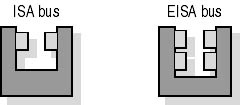
Figure 10.4 Cross section of ISA and EISA bus