Table 14-1 Budget Estimate for a Warehouse Stock Inventory and Ordering Application
| Resource | Cost per Day ($) | Duration (Months) | Cost($)* |
| 1 Project Manager | 750 | 12 | 180,000 |
| 1 Technical Lead | 600 | 12 | 144,000 |
| 3 Programmer | 450 x 3 = 1,350 | 10 | 270,000 |
| 1 Tester | 300 | 5 | 30,000 |
| TOTAL | 3000 | 624,000 | |
| *Based on working 20 days a month | |||
Some simple arithmetic shows that if all goes as planned, based on a five-day week, the total cost of the project will be $624,000. The company has decided that this will be the first of three development projects. The second will be a system to allow the purchasing department to do sales-trend analysis and sales predictions. The budget estimate for the second project is shown in Table 14-2.
Table 14-2 Budget Estimate for a Sales-Trend Analysis Application
| Resource | Cost per Day ($) | Duration (Months) | Cost($)* |
| 1 Project Manager | 750 | 10 | 150,000 |
| 1 Technical Lead | 600 | 10 | 120,000 |
| 2 Programmer | 450 x 2 = 900 | 8 | 144,000 |
| 1 Tester | 300 | 3 | 18,000 |
| TOTAL | 2550 | 432,000 | |
| *Based on working 20 days a month | |||
The third project will be a Web application that allows customers to query availability and price information 24 hours a day. The budget estimate for this project is shown in Table 14-3.
Table 14-3 Budget Estimate for an Internet Browser
| Resource | Cost per Day ($) | Duration (Months) | Cost($)* |
| 1 Project Manager | 750 | 9 | 135,000 |
| 1 Technical Lead | 600 | 9 | 108,000 |
| 1 Programmer | 450 | 8 | 72,000 |
| 1 Tester | 300 | 4 | 24,000 |
| TOTAL | 2100 | 339,000 | |
| *Based on working 20 days a month | |||
If we examine all three applications as a single system and then build the applications in sequence, it becomes apparent that the second and third applications will require far less development time than the first because they build on existing functionality. One advantage here is that building the second and third systems need not affect the first system. This situation is ideal for phased implementations. The success of this strategy depends largely on how well the design and analysis stages were completed. Figure 14-2 shows the design of all three applications. The three applications are treated as a single development for the purpose of planning. Reusable functionality is clearly visible, and although the developments will be written in phases, the reusable components can be designed to accommodate all the applications.
In the development of a multiple application system, design is of the utmost importance. It is the responsibility of the "business" to clearly define system requirements, which must also include future requirements. Defining future requirements as well as current ones helps designers to design applications that will be able to expand and change easily as the business grows. All successful businesses plan ahead. Microsoft plans its development and strategies over a 10-year period. Without knowledge of future plans, your business cannot make the most of object component reusability.
Looking back at the application design in Figure 14-2, you can see that all three systems have been included in the design. You can clearly see which components can be reused and where alterations will be required. Because the design uses object components, which as you'll recall are loosely coupled inherently, it would be possible to build this system in stages-base system 1, then 2, then 3.
Let's consider the estimates we did earlier. The main application was scheduled to be completed in 12 months and will have 12 major components. So ignoring code complexity, we can do a rough estimate, shown in Figure 14-3, of how much effort will be required to implement the other two applications. Take the figures with a grain of salt; they're just intended to provide a consistent comparison. In reality, any computer application development is influenced by all kinds of problems. It's especially important to keep in mind that new technologies will always slow down a development by an immeasurable factor.

Figure 14-2 Single development comprises three application systems
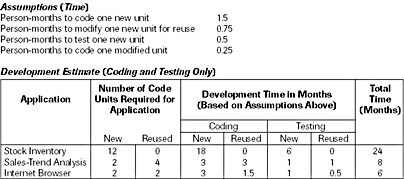
Figure 14-3 Rough time estimate for coding and testing three applications
The estimates for the three applications when viewed as standalone developments could well be feasible. When viewed as a whole, they give a clear picture of which components can be shared and therefore need to be written only once. The reusable components can be designed from the start to meet the needs of the second and third applications. Although this might add effort to the first project, the subsequent projects will in theory be shortened. Here are the three major benefits:
- The design anticipates and allows for future expansion.
- The overall development effort is reduced.
- Functionality can be allocated to the most appropriate resource. For example, a print specialist can code the print engine without affecting the interface coder.
As you can see, object components provide a number of advantages. Object components are vital to high-level code reuse because of their encapsulation, which allows functionality to be allocated to the most suitable resource. As Fred Brooks points out in The Mythical Man-Month: Essays on Software Engineering (Addison-Wesley, 1995), "Only through high-level reuse can ever more complex systems be built."
Object component practicalities
Object components are built using a special Visual Basic module type called a class module. The class module can contain properties, methods, and events and can consume properties, methods, and events from other classes (described later). Our example diagrams so far have been high level; that is, only the overall functionality of the object has been shown. In reality, an object component will usually consist of contained classes-each with properties, methods, and events. Figure 14-4 shows a more detailed example of how applications might interact with object components.For the programmer, using object components couldn't be simpler. An object component is written in ordinary Visual Basic code. To use an object, the programmer simply has to declare the object, instantiate it, and then call its methods and properties. Two additional and powerful features that greatly increase the power of object components were added to Visual Basic 5: the Implements statement and the Events capability.
The Implements statement allows you to build objects (class objects) and implement features from another class (base class). You can then handle a particular procedure in the new derived class or let the base class handle the procedure. Figure 14-5 shows an imaginary example of how Implements works. The exact coding methods are not shown here because they are covered fully in the online documentation that comes with Visual Basic 6. The example in Figure 14-5 is of an airplane autopilot system.
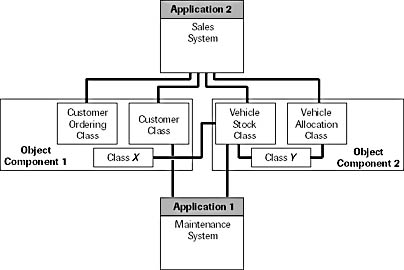
Figure 14-4 Classes within object components
Figure 14-5 shows a base Autopilot class that has TakeOff and BankLeft methods. Because different airplanes require different procedures to take off, the base Autopilot class cannot cater to individual take-off procedures, so instead it contains only a procedure declaration for this function. The BankLeft actions, however, are pretty much the same for all airplanes, so the Autopilot base class can perform the required procedures.
There are two types or classes of airplane in this example: a B737 and a Cessna. Both classes implement the autopilot functionality and therefore must also include procedures for the functions that are provided in the Autopilot base class. In the TakeOff procedure, both the Cessna and B737 classes have their own specific implementations. The BankLeft procedures, however, simply pass straight through to the BankLeft procedure in the Autopilot base class. Now let's say that the BankLeft procedure on the B737 changes so that B737 planes are limited to a bank angle of 25 degrees; in this case, you would simply replace the code in the B737 class BankLeft procedure so that it performs the required action.
Visual Basic 4 users might have noticed something interesting here: the Cessna and B737 classes have not instantiated the Autopilot class. This is because the instancing options for classes changed with Visual Basic 5. It is now possible to create a class that is global within the application without having to declare or instantiate it. Here are the new instancing settings:
- PublicNotCreatable Other applications cannot create this class unless the application in which the class is contained has already created an instance.
- GlobalSingleUse Any application using the class will get its own instance of the class. You don't need to Dim or Set a variable of the class to use it.
- GlobalMultiUse An application using the class will have to "queue" to use the class because it has only a single instance, which is shared with any other applications using the class. You don't need to Dim or Set a variable of the class to use it.
Only classes in ActiveX EXE projects have every Instancing option available to them. ActiveX DLL projects don't allow any of the SingleUse options, and ActiveX Control projects allow only Private or PublicNotCreatable.
The Events capability in Visual Basic 5 and 6 is the second useful and powerful new feature that is available to object classes. Essentially, it allows your object class to trigger an event that can be detected by clients of the object class. The "Introducing the progress form" section gives an example of how events are used.
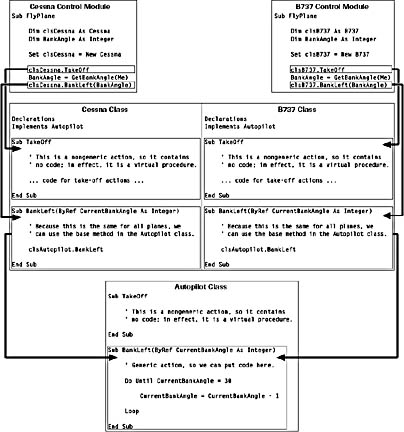
Figure 14-5 Example using the Implements statement
Reuse and Modules
With all the wonderful new techniques available it is easy to forget the humble standard module. Standard modules are ideal in cases where you have an internal unit of functionality that does not need to have an instance and might need to be available throughout the application. One feature of standard modules that is often forgotten, or not known, is that modules can contain properties and methods (but not events). A common problem with some applications is that the infrastructure code required to hold the application together is often written in to one or more standard modules each containing a multitude of public variables. While achieving the desired effect it can make for extremely difficult debugging and reuse. I'm sure you can all think of an instance where you were not sure if a particular public variable existed that would meet your requirements, and accordingly you created another-just to be sure!The practice of using public variables drastically cuts down the potential for reuse because the coupling of components becomes unclear. For example, if a particular function depended on the variable nPuUserPrivilege, how would you know what area of functionality owned this variable? Sure, you could press Shift+F2 to go to the definition, but the chances are there would be many more such instances. A better way might be to make the variable a public property variable. By doing so you have the added advantage of being able to build event code, giving you the opportunity to perform certain actions whenever the property is accessed. Another benefit is that you can add a description that appears in the Object Browser with the property or method. This can be done by choosing Procedure Attributes from the Tools menu. One technique that is good practice is to give your modules meaningful names and specify the scope when accessing one of its properties. For example, you could have two public properties called IsTaskRunning in separate modules and access them individually, like this:
If modFileProcessing.IsTaskRunning = True then ...
  If modReportProcessing.IsTaskRunning = True then ...
Standard modules have an advantage in that they cannot have multiple instances and they do not need to be created-they are there right when your application starts. This makes them ideal for general-control flow logic and high-level application control. The sample code below shows part of a standard module whose task is to control the user interface state. Notice in particular that rather than having to set many flags, the whole interface state can be configured by setting just one property.
Form code
  Sub Form_Load()
      Set basUIControl.MainForm = Me
  End Sub
  Sub SomeProcess()
      basUIControl.State = UIC_MyProcessStarted
      basUIControl.UpdateProgressBar 0
      For nCount = 1 To 70
          ... do process ...
          basUIControl.UpdateProgressBar (nCount \ 70) * 100
      Next nCount
      basUIControl.State = UIC_ProcessComplete
  End Sub
Standard module basUIControl
  Public Enum UIC_StateConstants
      UIC_MyProcessStarted
      UIC_ProcessComplete
      .
      .
      .
  End Enum
  Private Enum UIC_MenuType
      DisableWhileProcessing
      DisableOnUserType
      .
      .
      .
  End Enum
  Private m_MainForm As Form
  Public Property Set MainForm(frmForm As Form)
      Set m_MainForm = frmForm
  End Property
  Public Property Let State(nState As UIC_StateConstants)
      Dim mnuMenu As Menu
      Select Case nState
          ' If a process is starting then disable menus that are not allowed
          ' while processing.
          Case UIC_MyProcessStarted
              For Each mnuMenu In m_MainForm
                  If mnuMenu.Tag = UIC_MenuType.DisableWhileProcessing Then
                      mnuMenu.Enabled = False
                  End If
              Next mnuMenu
          Case ...
  End Property
The code shown above is totally legal and shows how-with careful planning and design-you can make even "environmental" type code reusable and loosely coupled. Note that the basUIControl module stores a pointer to the application's main form. This means that we can manipulate the form without actually knowing anything about it. In this example each menu item is assumed to have a Tag value specifying what type of menu item it is. In our logic, when the state is set to process running we use the tag to selectively turn off certain menu items.
In terms of reuse we have several benefits:
- If another UI related function is required, it is obvious where it should go.
- If a programmer needs to use a procedure from this module, it is clear from the Object Browser exactly what each property and method is for -assuming, of course, that you remember to fill in a description.
- It is far easier to see from the Object Browser if a particular property already exists, especially if similar logic is grouped.
From the progression of public variables to properties, one aspect that might not immediately spring to mind is that of application design. Because all our module's attributes now conform to a class specification, there is no reason why we cannot include the module in an object diagram. Normally we view public variables as elements whose scope is global, but in so doing they in effect have no scope-that is, they are not really part of any particular functional area of an application. By converting these variables to properties, we have (as a side effect) scoped these attributes to a specific functional element even though they are global. This can have enormous benefits in terms of application design because we can account for every last member. We are no longer in the position of having tightly coupled control elements. The picture below shows a simple program that has been reverse engineered using the Visual Modeler application that comes with Microsoft Visual Studio 98. Note that this sample is intended to illustrate that modules and their associated properties and methods are represented in the same way as class objects. This allows us to account for all elements in an application if we use public properties rather than public variables.
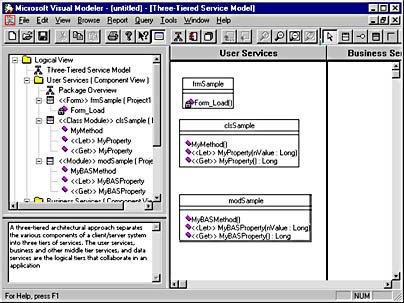
Figure 14-6 An object diagram created by the Visual Modeler application that comes with Microsoft Visual Studio 6