Pointers
A common criticism of Visual Basic is that it doesn't have a pointer type. It cannot therefore be used for modeling elaborate data types such as linked lists. Well, of course, Visual Basic has pointers-an object variable can be treated as a pointer. Just as you can have linked lists in C, so you can have them in Visual Basic.
Creating a linked list
Let's look at an example of a circular doubly linked list where each node has a pointer to the previous and next elements in the list, as shown in Figure 7-2. Notice in the code that we have a "notional" starting point, pHead, which initially points to the head of the list.
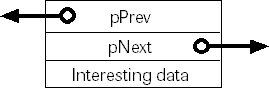
Figure 7-2 A node in the list
The Node Class
Option Explicit
' "Pointers" to previous and next nodes.
Public pNext As Node
Public pPrev As Node
' Something interesting in each node -
' the creation number (of the node)!
Public nAttribute As Integer
Private Sub Class_Initialize()
Set pNext = Nothing
Set pPrev = Nothing
End Sub
Private Sub Class_Terminate()
' When an object terminates, it will already have
' had to set these two members to Nothing:
' this code, then, is slightly redundant.
Set pNext = Nothing
Set pPrev = Nothing
End Sub
The Test Form
Option Explicit
Private pHead As New Node
Private pV As Node
Public Sub CreateCircularLinkedList()
Dim p As Node
Dim nLoop As Integer
Static pLast As Node ' Points to last node created
' pHead if first node.
pHead.nAttribute = 0
Set pLast = pHead
' 501 objects in list - the pHead object exists
' until killed in DeleteList.
For nLoop = 1 To 501
Set p = New Node
p.nAttribute = nLoop
Set pLast.pNext = p
Set p.pPrev = pLast
Set pLast = p
Next
' Decrement reference count on object.
Set pLast = Nothing
' Join the two ends of the list, making a circle.
Set p.pNext = pHead
Set pHead.pPrev = p
Exit Sub
End Sub
Public Sub PrintList()
Debug.Print "Forwards"
Set pV = pHead
Do
Debug.Print pV.nAttribute
Set pV = pV.pNext
Loop While Not pV Is pHead
Debug.Print "Backwards"
Set pV = pHead.pPrev
Do
Debug.Print pV.nAttribute
Set pV = pV.pPrev
Loop While Not pV Is pHead.pPrev
End Sub
Public Sub DeleteList()
Dim p As Node
Set pV = pHead
Do
Set pV = pV.pNext
Set p = pV.pPrev
If Not p Is Nothing Then
Set p.pNext = Nothing
Set p.pPrev = Nothing
End If
Set p = Nothing
Loop While Not pV.pNext Is Nothing
' Both of these point to pHead at the end.
Set pV = Nothing
Set pHead = Nothing
End Sub
The routines CreateCircularLinkedList, PrintList, and DeleteList should be called in that order. I have omitted building in any protection against deleting an empty list. To keep the example as short as possible, I've also excluded some other obvious routines, such as -InsertIntoList.
In Visual Basic, a node will continue to exist as long as an object variable is pointing to it (because a set object variable becomes the thing that the node is set to). For example, if two object variables point to the same thing, an equality check of one against the other (using Is) will evaluate to True (an equivalence operator). It follows, then, that for a given object all object variables that are set to point to it have to be set to Nothing for it to be destroyed. Also, even though a node is deleted, if the deleted node had valid pointers to other nodes, it might continue to allow other nodes to exist. In other words, setting a node pointer, p, to Nothing has no effect on the thing pointed to by p if another object variable, say, p1, is also pointing to the thing that p is pointing to. This means that to delete a node we have to set the following to Nothing: its pPrev object's pNext pointer, its pNext object's pPrev pointer, and its own pNext and pPrev pointers (to allow other nodes to be deleted later). And don't forget the object variable we have pointing to p to access all the other pointers and objects. Not what you might expect!
It's obvious that an object variable can be thought of as a pointer to something and also as the thing to which it points. Remember that Is should be used to compare references, not =. This is why we need Set to have the variable point to something else; that is, trying to change the object variable using assignment semantically means changing the value of the thing to which it points, whereas Set means changing the object variable to point elsewhere. In fact nearly any evaluation of an object variable yields the thing to which the object variable is pointing to. An exception is when an object variable is passed to a routine as a parameter, in which case the pointer is passed, not the value (the object) that it's pointing to. (The object also has an AddRef applied to it.)
Linked lists that are created using objects appear to be very efficient. They are fast to create and manipulate and are as flexible as anything that can be created in C.
Visual Basic 6 (VBA) is also able to yield real pointers, or addresses. Three undocumented VBA methods-VarPtr, ObjPtr, and StrPtr (which are just three different VBA type library aliases pointing to the same entry point in the run-time DLL)-are used to create these pointers. You can turn an object into a pointer value using l = ObjPtr(o), where o is the object whose address you want and l is a long integer in which the address of the object is put. Just resolving an object's address doesn't AddRef the object, however. You can pass this value around and get back to the object by memory copying l into a dummy object variable and then setting another object variable to this dummy (thus adding a reference to the underlying object).
Call CopyMemory(oDummy, l, 4) Set oThing = oDummy
CopyMemory should be defined like this:
Private Declare Sub CopyMemory Lib "kernel32" _
Alias "RtlMoveMemory" (pDest As Any, pSource As Any, _
ByVal ByteLen As Long)
The really neat thing here is that setting l doesn't add a reference to the object referenced by the argument of ObjPtr. Normally, when you set an object variable to point to an object, the object to which you point it (attach it, really) has its reference count incremented, meaning that the object can't be destroyed, because there are now two references to it. (This incrementing also happens if you pass the object as a parameter to a routine.) For an example of how this can hinder your cleanup of objects, see the discussion of the linked list example.
By using VarPtr (which yields the address of variables and UDTs), StrPtr (which yields the address of strings), and ObjPtr, you can create very real and very powerful and complex data structures.
Here's the short piece of code I used to discover that VarPtr, ObjPtr, and StrPtr are all pretty much the same thing (that is, the same function in a DLL):
Private Sub Form_Load()
' VB code to dump or match an external
' server method with a DLL entry point. Here it's
' used to dump the methods of the "_HiddenModule".
' Add a reference to 'TypeLib Information' (TLBINF32.DLL),
' which gives you TLI before running this code.
Dim tTLInfo As TypeLibInfo
Dim tMemInfo As MemberInfo
Dim sDLL As String
Dim sOrdinal As Integer
Set tTLInfo = _
TLI.TLIApplication.TypeLibInfoFromFile("MSVBVM50.DLL")
For Each tMemInfo In _
tTLInfo.TypeInfos.NamedItem("_HiddenModule").Members
With tMemInfo
tMemInfo.GetDllEntry sDLL, "", sOrdinal
' labDump is the label on the form where the
' output will be printed.
labDump.Caption = labDump.Caption & _
.Name & _
" is in " & _
sDLL & _
" at ordinal reference " & sOrdinal & _
vbCrLf
End With
Next
End Sub
The code uses TLBINF32.DLL, which can interrogate type libraries (very handy). Here I'm dumping some information on all the methods of a module (in type library parlance) named _HiddenModule. You'll see that this is the module that contains VarPtr, ObjPtr, and StrPtr, which you can discover using OLEVIEW.EXE to view MSVBVM60.DLL:
module _HiddenModule {
[entry(0x60000000), vararg, helpcontext(0x000f6c9d)]
VARIANT _stdcall Array([in] SAFEARRAY(VARIANT)* ArgList);
[entry(0x60000001), helpcontext(0x000f735f)]
BSTR _stdcall _B_str_InputB(
[in] long Number,
[in] short FileNumber);
[entry(0x60000002), helpcontext(0x000f735f)]
VARIANT _stdcall _B_var_InputB(
[in] long Number,
[in] short FileNumber);
[entry(0x60000003), helpcontext(0x000f735f)]
BSTR _stdcall _B_str_Input(
[in] long Number,
[in] short FileNumber);
[entry(0x60000004), helpcontext(0x000f735f)]
VARIANT _stdcall _B_var_Input(
[in] long Number,
[in] short FileNumber);
[entry(0x60000005), helpcontext(0x000f65a4)]
void _stdcall Width(
[in] short FileNumber,
[in] short Width);
[entry(0x60000006), hidden]
long _stdcall VarPtr([in] void* Ptr);
[entry(0x60000007), hidden]
long _stdcall StrPtr([in] BSTR Ptr);
[entry(0x60000008), hidden]
long _stdcall ObjPtr([in] IUnknown* Ptr);
};
When you run the Visual Basic code, you'll see this output:
Label1Array is in VBA5.DLL at ordinal reference 601 _B_str_InputB is in VBA5.DLL at ordinal reference 566 _B_var_InputB is in VBA5.DLL at ordinal reference 567 _B_str_Input is in VBA5.DLL at ordinal reference 620 _B_var_Input is in VBA5.DLL at ordinal reference 621 Width is in VBA5.DLL at ordinal reference 565 VarPtr is in VBA5.DLL at ordinal reference 644 StrPtr is in VBA5.DLL at ordinal reference 644 ObjPtr is in VBA5.DLL at ordinal reference 644
This output shows the method name together with the DLL and ordinal reference (into the DLL) that implements its functionality. If you use DUMPBIN /EXPORTS on MSVBVM60.DLL like this:
dumpbin /exports msvbvm60.dll > dump
and then examine the dump file, you'll see that the routine at ordinal 644 is in fact VarPtr. In other words, VarPtr, ObjPtr, and StrPtr all do their stuff in the MSVBVM60.DLL routine VarPtr!
Matching the code output to the dump, we see this:
Method Name DLL Routine Name Label1Array rtcArray _B_str_InputB rtcInputCount _B_var_InputB rtcInputCountVar _B_str_Input rtcInputCharCount _B_var_Input rtcInputCharCountVar Width rtcFileWidth VarPtr VarPtr StrPtr VarPtr ObjPtr VarPtr
I haven't explained what the other routines do-you can discover that for yourself.