NOTE
If you are building a large Internet system, you can define a set of rules that all developers must use when creating Web pages. If the Web pages are written using XML, a DTD can be used to verify that all the pages follow the rules. XML can also be used to pass information from one corporation to another or from one department to another within a corporation. The DTD can be used to verify that the incoming information is in the correct format.
To open the sample document in XML Authority, follow these steps:
- Open XML Authority, select New from the File menu, and then select New (DTD) from the submenu. If a default UNNAMED element appears at the top of the document, delete it.
- Choose Import from the File menu, and then choose XML Document from the submenu.
- Select the Standard.xml document you created in Chapter 3. XML Authority will import the document as a DTD.
-
Figure 4-1 shows Standard.xml displayed in XML Authority.
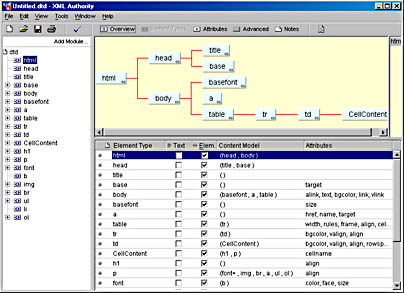
Figure 4-1. The Standard.xml template displayed in XML Authority.
- Choose Source from the View menu.
XML Authority automatically builds a DTD for the XML document, so in this case, the source is a DTD for the Standard.xml XML document. The complete source code that XML Authority generated is shown here:
  <!ELEMENT html  (head, body)>
  <!ELEMENT head  (title, base)>
  <!ELEMENT title  ( )>
  <!ELEMENT base  ( )>
  <!ATTLIST base  target CDATA  #REQUIRED>
  <!ELEMENT body  (basefont, a, table)>
  <!ATTLIST body  alink   CDATA  #REQUIRED
                  text    CDATA  #REQUIRED
                  bgcolor CDATA  #REQUIRED
                  link    CDATA  #REQUIRED
                  vlink   CDATA  #REQUIRED>
  <!ELEMENT basefont  ( )>
  <!ATTLIST basefont  size CDATA  #REQUIRED>
  <!ELEMENT a  ( )>
  <!ATTLIST a  href   CDATA  #IMPLIED
               name   CDATA  #IMPLIED
               target CDATA  #IMPLIED>
  <!ELEMENT table  (tr)>
  <!ATTLIST table  width       CDATA  #REQUIRED
                   rules       CDATA  #REQUIRED
                   frame       CDATA  #REQUIRED
                   align       CDATA  #REQUIRED
                   cellpadding CDATA  #REQUIRED
                   border      CDATA  #REQUIRED
                   cellspacing CDATA  #REQUIRED>
  <!ELEMENT tr  (td)>
  <!ATTLIST tr  bgcolor CDATA  #REQUIRED
                valign  CDATA  #REQUIRED
                align   CDATA  #REQUIRED>
  <!ELEMENT td  (CellContent)>
  <!ATTLIST td  bgcolor CDATA  #REQUIRED
                valign  CDATA  #REQUIRED
                align   CDATA  #REQUIRED
                rowspan CDATA  #REQUIRED
                colspan CDATA  #REQUIRED>
  <!ELEMENT CellContent  (h1, p)>
  <!ATTLIST CellContent  cellname CDATA  #REQUIRED>
  <!ELEMENT h1  ( )>
  <!ATTLIST h1  align CDATA  #REQUIRED>
  <!ELEMENT p  (font+, img, br, a, ul, ol)>
  <!ELEMENT font  (b)>
  <!ATTLIST font  color CDATA  #REQUIRED
                  face  CDATA  #REQUIRED
                  size  CDATA  #REQUIRED>
  <!ELEMENT b  ( )>
  <!ELEMENT img  ( )>
  <!ATTLIST img  width  CDATA  #REQUIRED
                 height CDATA  #REQUIRED
                 hspace CDATA  #REQUIRED
                 vspace CDATA  #REQUIRED
                 src    CDATA  #REQUIRED
                 alt    CDATA  #REQUIRED
                 align  CDATA  #REQUIRED
                 border CDATA  #REQUIRED
                 lowsrc CDATA  #REQUIRED>
  <!ELEMENT br  ( )>
  <!ATTLIST br  clear CDATA  #REQUIRED>
  <!ELEMENT ul  (font, li)>
  <!ATTLIST ul  type CDATA  #REQUIRED>
  <!ELEMENT li  (font, a)>
  <!ELEMENT ol  (font, li)>
  <!ATTLIST ol  type  CDATA  #REQUIRED
                start CDATA  #REQUIRED>
As you can see, the DTD consists of two basic components: !ELEMENT and !ATTLIST. In this chapter, we will look at these two statements in detail.
NOTE
The DTD that has been generated here is only the first approximation. In this chapter, you will refine this DTD so that it defines a set of rules for your XML documents.
by updated