Web-based user services components that respond directly to the user's input without having to go back to the server contain DHTML that is embedded in the HTML page. The DHTML code accesses the objects belonging to the Web browser that is hosting the HTML page. The ability to access the browser's objects is what allows DHTML to read and change the content in the Web page and respond to events created by objects in the page. Thus, DHTML creates dynamic Web-based user services components by accessing the browser's objects.
NOTE
Starting with version 4, Microsoft Internet Explorer included DHTML in its technology to allow developers to create Web-based user services components that could respond to the user's input. Netscape Navigator also included a version of DHTML in its Web browser that gave access to the Netscape objects. In addition to including code within HTML pages, Internet Explorer 4 introduced scriptlets that allow developers to separate the code from the Web page. The scriptlets are Web pages that contain functions or subroutines that can be accessed and used by a Web page.
DHTML Object Model
DHTML uses an object model to give developers programmable access to the components in a Web page, from the HTML tags to the document itself. The document object can be accessed through script in the HTML page. The DHTML object model uses collections to contain elements in the HTML document. The elements are contained in a hierarchical fashion. Let's use the following HTML code as an example of using DHTML elements and collections in a DHTML document:
  <html>
      <head>
          <title>
             DHTML
             </title>
             <script language="vbscript">
                 Function showTags()
                     dim strTagNames, intCounter
                     strTagNames=""
                     For intCounter=0 to window.document.all.length-1
                     strTagNames=strTagNames & _
                         window.document.all(intCounter).tagName & " "
                     Next
                     MsgBox "The tags are: " & strTagNames
                 End Function
             </script>
  </head>
  <body onload="showTags()">
      <h1>
      This page demonstrates DHTML.
      </h1>
      <p>
      This document contains several <br></br><b>tags</b>
      </p>
  </body>
  </html>
The function could have also been written in JScript as follows:
  <script language = "JScript">
  function showTags()
      {
      var strTagNames = "";
      for (intCounter = 0; intCounter < document.all.length;
           intCounter++)
           {
           strTagNames = strTagNames +
              window.document.all(intCounter).tagName + " ";
           }
      alert ("This document contains the following tags: " +
             strTagNames);
      }
  </script>
This DHTML document appears as shown in Figure 13-1.
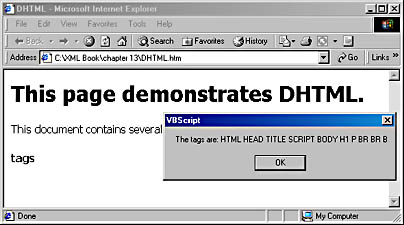
Figure 13-1. The DHTML page in Internet Explorer 5
The showTags function shown in the above code uses the window object, which is the top level DHTML object. Contained within the window object is the document object. Contained within the document object is the all collection. The all collection contains all the elements within the document. The first item in the all collection has an index of zero. You can access this item by using all(0). The length property of the all collection is the number of items in the collection. Thus, the above code will go through the all collection and get the name of each item in the collection. Notice that the closing br tag that we added to make the document compatible with XHTML was considered another tag. We could have also written just document.all(intCounter) instead of window.document.all(intCounter), as window is the default object.
NOTE
Netscape Navigator does not support the Internet Explorer DHTML object hierarchy. There are some similarities between the two, but currently you can write DHTML for either Netscape Navigator or Internet Explorer or write code that works with the few objects that they both share. We will work with only the Internet Explorer DHTML object model, as it is most similar to the W3C DOM standard.