Figure 9-3. The login page shows a failed login attempt
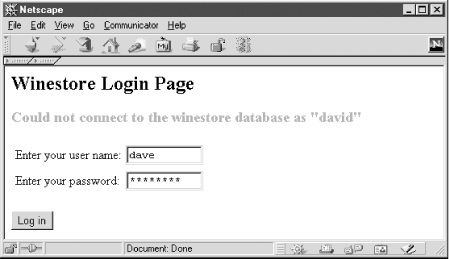
Example 9-8 shows the login script with two helper functions that generate the HTML. The function login_page( ) generates the HTML <form> that collects two named <input> fields: formUsername and formPassword. The argument $loginMessage passes any error or warning messages the login page needs to display. If the $loginMessage is set, a formatted message is generated and included in the page. When the <form> is submitted, the formUsername and formPassword fields are encoded as POST variables and are processed by the script that performs the authentication.
The function logged_on_page( ) in Example 9-8 generates the HTML that is used when the script detects that a user has already logged in to the application. The main part of the script initializes a session and checks if the user has already been authorized. If the session variable authenticatedUser is registered, the user has already been authorized and the function logged_on_page( ) is called. If not, the entry <form> is displayed by calling the function login_page( ), and the session is destroyed.
Example 9-8. The PHP script that generates the login <form>
<?php
// Function that returns the HTML FORM that is
// used to collect the username and password
function login_page($errorMessage)
{
  // Generate the Login-in page
  ?>
<!DOCTYPE HTML PUBLIC
    "-//W3C//DTD HTML 4.0 Transitional//EN"
    "http://www.w3.org/TR/html4/loose.dtd" >
  <html>
    <head><title>Login</title></head>
    <body>
    <h2>Winestore Login Page</h2>
    <form method="POST" action="example.9-9.php">
  <?
  // Include the formatted error message
  if (isset($errorMessage))
    echo
      "<h3><font color=red>$errorMessage</font></h3>";
  // Generate the login <form> layout
  ?>
    <table>
      <tr><td>Enter your username:</td>
          <td><input type="text" size=10
                   maxlength=10
                   name="formUsername"></td></tr>
      <tr><td>Enter your password:</td>
          <td><input type="password" size=10
                   maxlength=10
                   name="formPassword"></td></tr>
    </table>
    <p><input type="submit" value="Log in">
    </form>
    </body>
  </html>
  <?
}
//
// Function that returns HTML page showing that
// the user with the $currentLoginName is logged on
function logged_on_page($currentLoginName)
{
  // Generate the page that shows the user
  // is already authenticated and authorized
  ?>
<!DOCTYPE HTML PUBLIC
      "-//W3C//DTD HTML 4.0 Transitional//EN"
      "http://www.w3.org/TR/html4/loose.dtd" >
  <html>
  <head><title>Login</title></head>
  <body>
    <h2>Winestore</h2>
    <h2>You are currently logged in as
        <?=$currentLoginName ?></h2>
    <a href="example.9-10.php">Logout</a>
  </body>
  </html>
  <?
}
// Main
session_start(  );
// Check if we have established a session
if (isset($HTTP_SESSION_VARS["authenticatedUser"]))
{
  // There is a user logged on
  logged_on_page(
          $HTTP_SESSION_VARS["authenticatedUser"]);
}
else
{
  // No session established, no POST variables
  // display the login form + any error message
  login_page($HTTP_SESSION_VARS["loginMessage"]);
  session_destroy(  );
}
?>
It is important that the script test the associative array holding the session variable $HTTP_SESSION_VARS["authenticatedUser"] rather than the global variable $authenticatedUser. Because of the default order in which PHP initializes global variables from GET, POST, and session variables, a user can override the value of $authenticatedUser simply by defining a GET or POST variable in the request. We discussed security problems with PHP variable initialization in Chapter 5.
