To set up a calculated field, use the Add method with the CalculatedFields object. You have to specify a field name and a formula. Note that if you create a field called Average Price, the default pivot table produces a field called Sum of Average Price. This is misleading and downright silly. What you have is actually the average of the sums of prices. The solution is to use the Name property when defining the data field to replace Sum of Average Price with something such as Avg Price. Note that this name must be different from the name for the calculated field.
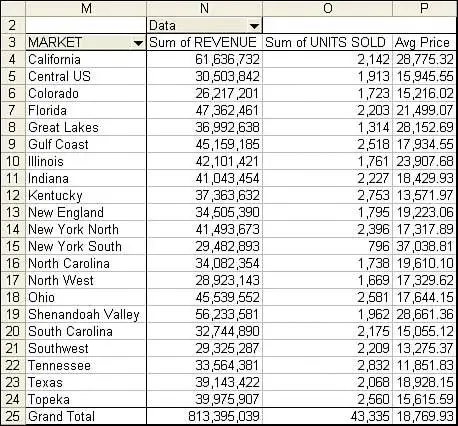
Listing 2 produces the report shown in Figure 13.
Listing 2. Code That Calculates an Average Price Field as a Second Data Field
Sub TwoDataFields()
    Dim WSD As Worksheet
    Dim PTCache As PivotCache
    Dim PT As PivotTable
    Dim PRange As Range
    Dim FinalRow As Long

    Set WSD = Worksheets("PivotTable")
    Dim WSR As Worksheet
    Dim WBO As Workbook
    Dim WBN As Workbook
    Set WBO = ActiveWorkbook

    ' Delete any prior pivot tables
    For Each PT In WSD.PivotTables
        PT.TableRange2.Clear
    Next PT

    ' Define input area and set up a Pivot Cache
    FinalRow = WSD.Cells(Application.Rows.Count, 1).End(xlUp).Row
    FinalCol = WSD.Cells(1, Application.Columns.Count). _
        End(xlToLeft).Column
    Set PRange = WSD.Cells(1, 1).Resize(FinalRow, FinalCol)
    Set PTCache = ActiveWorkbook.PivotCaches.Add(SourceType:= _
        xlDatabase, SourceData:=PRange.Address)

    ' Create the Pivot Table from the Pivot Cache
    Set PT = PTCache.CreatePivotTable(TableDestination:=WSD. _
        Cells(2, FinalCol + 2), TableName:="PivotTable1")

    ' Turn off updating while building the table
    PT.ManualUpdate = True

    ' Set up the row fields
    PT.AddFields RowFields:="Market", ColumnFields:="Data"

    ' Define Calculated Fields
    PT.CalculatedFields.Add Name:="AveragePrice", Formula:="=Revenue/Units Sold"

    ' Set up the data fields
    With PT.PivotFields("Revenue")
        .Orientation = xlDataField
        .Function = xlSum
        .Position = 1
        .NumberFormat = "#,##0"
    End With

    With PT.PivotFields("Units Sold")
        .Orientation = xlDataField
        .Function = xlSum
        .Position = 2
        .NumberFormat = "#,##0"
    End With

    With PT.PivotFields("AveragePrice")
        .Orientation = xlDataField
        .Function = xlSum
        .Position = 3
        .NumberFormat = "#,##0.00"
        .Name = "Avg Price"
    End With

    ' Ensure that you get zeroes instead of blanks in the data area
    PT.NullString = "0"

    ' Calc the pivot table
    PT.ManualUpdate = False
    PT.ManualUpdate = True

End Sub
13. The virtual "Data" dimension contains two fields from your dataset plus a calculation. It is shown along the column area of the report.
by updated