The Problem:
Now I'm totally stuck. Word can't even create files in my user folder!
The Solution:
This problem most likely means that you need to repair your disk permissions and then restart Mac OS X.
Insert Text at the End of a Document
The Problem:
I've got a minor peeve (probably because things work differently in most other programs, including Entourage): if I want to add more text below the last line in a document, I can't just click in the white area beneath the line; instead, I have to click at the end of the last line and hit Return.
The Solution:
You should be able to do this the way you wantat least, if you're double-clicking rather than single-clicking, and you're using Page Layout view or Online Layout view. Choose Word » Preferences, click the Edit item, and check the "Enable click and type" box. You'll then be able to double-click however far after the end of the document you want, and Word will automatically add the necessary blank paragraphs and spaces to get you there.
That said, if you don't want Word inserting extra paragraphs and tabs to bring the insertion point to the exact space where you clicked, you may prefer to click at the end of the last paragraph and create another paragraph manually.
Turn Off Auto-Capping in Tables
The Problem:
Brilliant! Word 2004's AutoCorrect feature doesn't include a "Capitalize first letter of table cells" checkboxso you can't tell Word not to capitalize the first word inside a table cell. At least AutoCorrect in Word X didn't mess with table contents.
The Solution:
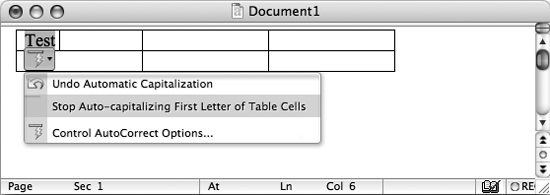
It's hard to see how Microsoft could claim that this omission of a user interface control is a feature rather than a faultbut fortunately, there's a fix. Insert a table, type a word starting with a lowercase letter in one of the cells, and press the spacebar to trigger the AutoCorrect action. Click the AutoCorrect Smart Tag, and choose "Stop Auto-capitalizing First Letter of Table Cells" from the menu (see Figure 10-3). A quick warning, though: once you turn off this option, you can never turn it back on.
Figure 10-3. Use the AutoCorrect Options Smart Tag to turn off auto-capitalization in tables.