For wine searching, a combined script is implemented by replacing the main section of Example 5-5 with the code fragment shown in Example 5-6. The difference between the two scripts is that Example 5-6 has the structure:
// Has the user provided the parameter?
if (empty($regionName))
{
 // Yes, produce the HTML <form> to collect a regionName
} else
{
 // No, run the query for wines in the region $regionName
}
With this structure, when the variable $regionName is empty-that is, the user has not yet entered anything-the user <form> is produced. When a value has been entered, the query is run and the results are output. Example 5-6 shows you how to replace the main section of the code from Example 5-5 with the <form> from Example 5-2. With this modification, only one file is required to produce the user form and then process the query output.
Example 5-6. A combined <form> and processing script to display wineries in a region
<!DOCTYPE HTML PUBLIC
               "-//W3C//DTD HTML 4.0 Transitional//EN"
               "http://www.w3.org/TR/html4/loose.dtd">
<html>
<head>
  <title>Exploring Wines in a Region</title>
</head>
<body bgcolor="white">
<?php
  include 'db.inc';
  // Show all wines in a region in a <table>
  function displayWinesList($connection,
                            $query,
                            $regionName)
  {
     // Run the query on the DBMS
     if (!($result = @ mysql_query ($query, $connection)))
        showerror(  );
     // Find out how many rows are available
     $rowsFound = @ mysql_num_rows($result);
     // If the query has results ...
     if ($rowsFound > 0)
     {
         // ... print out a header
         echo "Wines of $regionName<br>";
         // and start a <table>.
         echo "\n<table>\n<tr>" .
              "\n\t<th>Wine ID</th>" .
              "\n\t<th>Wine Name</th>" .
              "\n\t<th>Type</th>" .
              "\n\t<th>Year</th>" .
              "\n\t<th>Winery</th>" .
              "\n\t<th>Description</th>\n</tr>";
         // Fetch each of the query rows
         while ($row = @ mysql_fetch_array($result))
         {
            // Print one row of results
            echo "\n<tr>" .
                 "\n\t<td>" . $row["wine_id"] . "</td>" .
                 "\n\t<td>" . $row["wine_name"] . "</td>" .
                 "\n\t<td>" . $row["type"] . "</td>" .
                 "\n\t<td>" . $row["year"] . "</td>" .
                 "\n\t<td>" . $row["winery_name"] . "</td>" .
                 "\n\t<td>" . $row["description"] . "</td>" .
                 "\n</tr>";
         } // end while loop body
         // Finish the <table>
         echo "\n</table>";
     } // end if $rowsFound body
     // Report how many rows were found
     echo "$rowsFound records found matching your
           criteria<br>";
  } // end of function
  $scriptName = "example.5-6.php";
  // Has the user provided the parameter?
  if (empty($regionName))
  {
     // No, the user hasn't provided a parameter
?>
     <form action="<?=$scriptName;?>" method="GET">
       <br>Enter a region to browse :
       <input type="text" name="regionName" value="All">
       (type All to see all regions)
       <br>
       <input type="submit" value="Show wines">
     </form><br>
     <a href="Preface.htmll">Home</a>
<?php
  } // end of if empty($regionName) body
  else
  {
     // Secure the user parameter $regionName
     $regionName = clean($regionName, 30);
     // Connect to the MySQL DBMS
     if (!($connection = @ mysql_connect($hostName,
                                         $username,
                                         $password)))
        die("Could not connect");
     if (!mysql_select_db($databaseName, $connection))
        showerror(  );
     // Start a query ...
     $query = "SELECT   w.wine_id,
                        w.wine_name,
                        w.description,
                        w.type,
                        w.year,
                        wry.winery_name
               FROM     winery wry, region r, wine w
               WHERE    wry.region_id = r.region_id
               AND      w.winery_id = wry.winery_id";
      // ... then, if the user has specified a region,
      // add the regionName as an AND clause ...
      if ($regionName != "All")
        $query .= " AND r.region_name = \"$regionName\"";
      // ... and then complete the query.
      $query .= " ORDER BY w.wine_name";
      // run the query and show the results
      displayWinesList($connection, $query, $regionName);
      // Close the DBMS connection
      mysql_close($connection);
  } // end of else if empty($regionName) body
?>
</body>
</html>
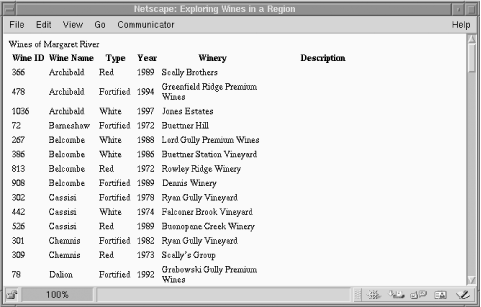
We use this combined script structure throughout the rest of this tutorial. Output of Example 5-6 with the Margaret River parameter is shown in Figure 5-6.
Figure 5-6. Output of the combined script from Example 5-6