To input parameters into the querying process, the user usually selects or types data into an HTML <form> environment, or clicks on links that request scripts.
We explain user-driven querying by introducing how to:
- Pass data from a web browser to a web server.
- Access user data in scripts.
- Secure interactive query systems.
- Query databases with user data.
-
Produce one script that contains an HTML
<form>and the code that outputs the query results. We call this a combined script. - Develop results pages with previous page and next page links.
- Use five-step querying to produce components for user input.
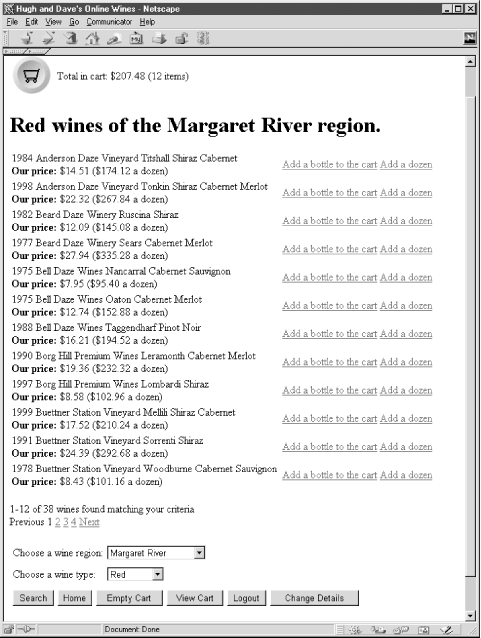
Our case-study example in this tutorial is the wine browsing component of the winestore. Similar to most user-driven modules, the wine browsing component has two subcomponents: first, the search bar allows the user to enter a type of wine as a criteria for a database query; and, second, the results pages show the user the wines that match the criteria entered in the search bar. The search bar is shown in Figure 5-1 at the base of the winestore search page, and the results of running the query are presented above it in a results page. The results pages allow the user to view the wines in pages of 12 wines each, move between results pages, and add wines to his shopping cart.
Figure 5-1. The winestore search bar and results page
The querying just described is a two-component user-driven querying process. A less common type of user-driven querying describes a query that doesn't produce output, but instead returns the user directly to the query input component. This one-component querying process is often used to add items to a shopping cart. We also explain one-component querying in this tutorial.
