AutoShow Feature to Produce Executive Overviews
If you are designing an executive dashboard utility, you might want to spotlight the top five markets.
As with the AutoSort option, you could be a pivot table pro and never have stumbled across the AutoShow feature in Excel. This setting lets you select either the top or bottom n records based on any data field in the report.
The code to use AutoShow in VBA uses the .AutoShow method.
' Show only the top 5 Markets
PT.PivotFields("Market").AutoShow Top:=xlAutomatic, Range:=xlTop, _
    Count:=5, Field:="Sum of Revenue"
When you create a report using the AutoShow method, it is often helpful to copy the data and then go back to the original pivot report to get the totals for all markets. In the following code, this is achieved by removing the Market field from the pivot table and copying the grand total to the report. Listing 6 produces the report shown in Figure 18.
Listing 6. Code Used to Create the Top 5 Markets Report
Sub Top5Markets()
    ' Produce a report of the top 5 markets
    Dim WSD As Worksheet
    Dim WSR As Worksheet
    Dim WBN As Workbook
    Dim PTCache As PivotCache
    Dim PT As PivotTable
    Dim PRange As Range
    Dim FinalRow As Long
    Set WSD = Worksheets("PivotTable")

    ' Delete any prior pivot tables
    For Each PT In WSD.PivotTables
        PT.TableRange2.Clear
    Next PT

    ' Define input area and set up a Pivot Cache
    FinalRow = WSD.Cells(Application.Rows.Count, 1).End(xlUp).Row
    FinalCol = WSD.Cells(1, Application.Columns.Count). _
        End(xlToLeft).Column
    Set PRange = WSD.Cells(1, 1).Resize(FinalRow, FinalCol)
    Set PTCache = ActiveWorkbook.PivotCaches.Add(SourceType:= _
        xlDatabase, SourceData:=PRange.Address)

    ' Create the Pivot Table from the Pivot Cache
    Set PT = PTCache.CreatePivotTable(TableDestination:=WSD. _
        Cells(2, FinalCol + 2), TableName:="PivotTable1")

    ' Turn off updating while building the table
    PT.ManualUpdate = True

    ' Set up the row fields
    PT.AddFields RowFields:="Market", ColumnFields:="Line of Business"

    ' Set up the data fields
    With PT.PivotFields("Revenue")
        .Orientation = xlDataField
        .Function = xlSum
        .Position = 1
        .NumberFormat = "#,##0"
        .Name = "Total Revenue"
    End With

    ' Ensure that you get zeroes instead of blanks in the data area
    PT.NullString = "0"

    ' Sort markets descending by sum of revenue
    PT.PivotFields("Market").AutoSort Order:=xlDescending, _
        Field:="Total Revenue"

    ' Show only the top 5 markets
    PT.PivotFields("Market").AutoShow Type:=xlAutomatic, Range:=xlTop, _
        Count:=5, Field:="Total Revenue"

    ' Calc the pivot table to allow the date label to be drawn
    PT.ManualUpdate = False
    PT.ManualUpdate = True

    ' Create a new blank workbook with one worksheet
    Set WBN = Workbooks.Add(xlWBATWorksheet)
    Set WSR = WBN.Worksheets(1)
    WSR.Name = "Report"
    ' Set up ritle for report
    With WSR.[A1]
        .Value = "Top 5 Markets"
        .Font.Size = 14
    End With

    ' Copy the pivot table data to row 3 of the report sheet
    ' Use offset to eliminate the title row of the pivot table
    PT.TableRange2.Offset(1, 0).Copy
    WSR.[A3].PasteSpecial Paste:=xlPasteValuesAndNumberFormats
    LastRow = WSR.Cells(65536, 1).End(xlUp).Row
    WSR.Cells(LastRow, 1).Value = "Top 5 Total"

    ' Go back to the pivot table to get totals without the AutoShow
    PT.PivotFields("Market").Orientation = xlHidden
    PT.ManualUpdate = False
    PT.ManualUpdate = True
    PT.TableRange2.Offset(2, 0).Copy
    WSR.Cells(LastRow + 2, 1).PasteSpecial Paste:=xlPasteValuesAndNumberFormats
    WSR.Cells(LastRow + 2, 1).Value = "Total Company"

    ' Clear the pivot table
    PT.TableRange2.Clear
    Set PTCache = Nothing

    ' Do some basic formatting
    ' Autofit columns, bold the headings, right-align
    WSR.Range(WSR.Range("A3"), WSR.Cells(LastRow + 2, 6)).Columns.AutoFit
    Range("A3").EntireRow.Font.Bold = True
    Range("A3").EntireRow.HorizontalAlignment = xlRight
    Range("A3").HorizontalAlignment = xlLeft

    Range("A2").Select
    MsgBox "CEO Report has been Created"
End Sub
18. The Top 5 Markets report contains two pivot tables.
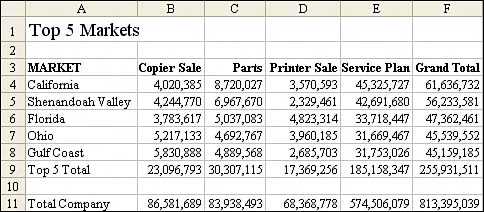
The Top 5 Markets report actually contains two snapshots of a pivot table. After using the AutoShow feature to grab the top five markets with their totals, the macro went back to the pivot table, removed the AutoShow option, and grabbed the total of all markets to produce the Total Company row.